DUB Configuration Options via S3 for Mobile
The following DUB configuration options are made through
the S3 application:
· Banners
· Directory
· Discussions
· Events
· Home Page
· Important
Phone Numbers
· Mobile Information
· Internal Settings
· Login Page
· Messages
· My Card
· News
· Notifications
· Store
· Updating
the Personify Database Username and Password for Mobile
The S3 application is hosted by the DUB offices and
works in conjunction with your Personify Web Services, Personify database,
and e-Business site to create your association’s mobile application.
 Each
organization’s mobile application has unique S3 configurations which affect
the general functionality of the Personify Mobile application. However,
most of the configuration options in S3 will be delivered by default by
your business consultant.
Each
organization’s mobile application has unique S3 configurations which affect
the general functionality of the Personify Mobile application. However,
most of the configuration options in S3 will be delivered by default by
your business consultant.
The S3 application displays red, yellow, and green icons next to each
of the features options on the features menu.
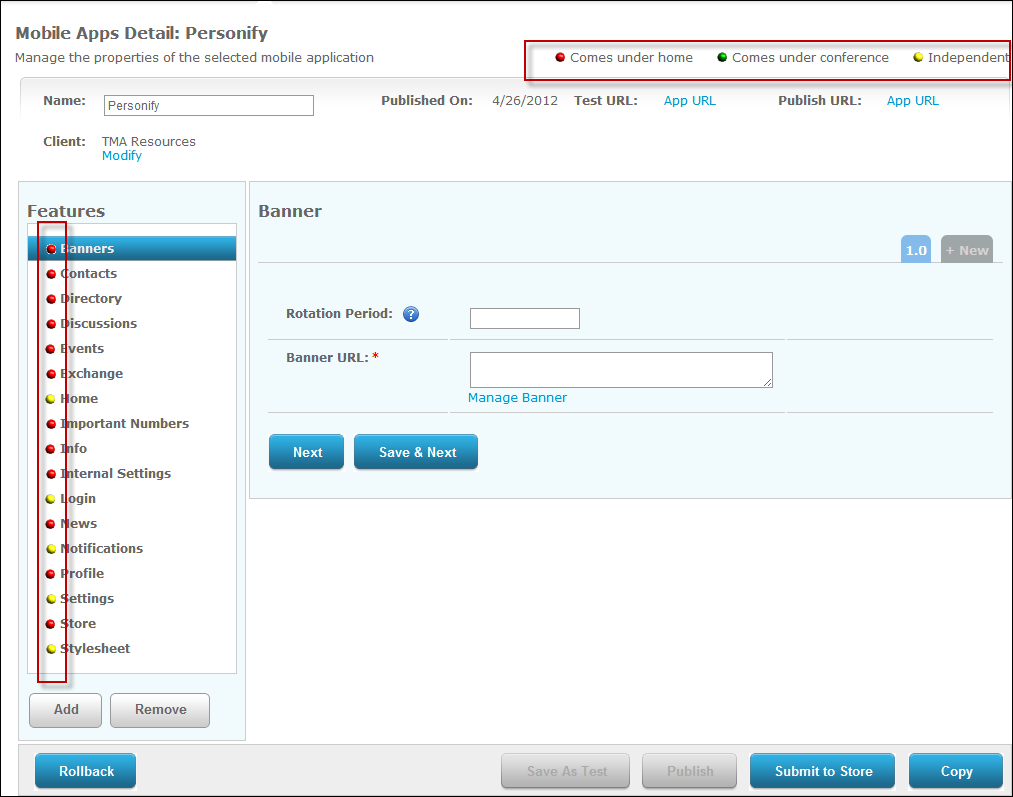
The icons indicate the location where the options appear in the mobile
application. Those options marked with a red icon appear on the Home module,
while the yellow icon indicates that an option only appears in support
modules. The green icon indicates that an option displays in another application
supported by DUB. This icon is not applicable to any of the menu options
currently displayed for Personify Mobile.
Once you have configured the appropriate settings in
each module, you can then test the Personify Mobile application on the
iPhone, Blackberry, and Android. For more information, please see Testing
your Mobile Changes in S3. After you have successfully tested and
approve your changes, you must publish the changes. For more information,
please see Publishing
your Mobile Changes in S3.