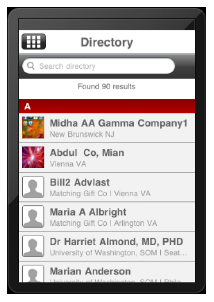
The Directory module allows users to search through other user profiles entered in the Personify database. Web services pull information from Personify into the mobile application. For more information, please see Configuring the Mobile Directory Module.
 Only
current members who enabled their “Include in Directory” flag appear in
the Directory list. By default, this is set to "Y". For more
information on this, please see Adding
the Include_In_Directory Flag to Customer Central.
Only
current members who enabled their “Include in Directory” flag appear in
the Directory list. By default, this is set to "Y". For more
information on this, please see Adding
the Include_In_Directory Flag to Customer Central.
The search function analyzes all facets of a user’s profile when retrieving results, including First Name, Last Name, Alias, City, State, Postal Code, or Employer. Your association can customize the related web service in order to restrict these search results, such as excluding City from the searchable fields.
While viewing another user’s profile, users can add the contact to their mobile device address book and request a contact exchange with that person. Exchanging contact information with another user adds that user’s profile to your Contacts list. This is discussed further in the Mobile Contacts Module section.
Users
who are defined as staff members will see a user’s credentials and the
member icon “M” throughout the directory, whereas users who are only defined
as members will not see the credentials of other members.