For security reasons, any request to available entities/service operations must be accompanied with authentication information (through Authentication Headers of Http Request), unless configured with "anonymous" access. For more information, please see Anonymous Data Services. The user name/password will be validated against PSM_USER configuration with respect to OrgId and OrgUnitId configured through “DefaultOrgId” and “DefaultOrgUnitId” entries in the web.config file. The entries would look like the following:
<appSettings>
<add key="DefaultOrgId" value="YourOrgId" />
<add key="DefaultOrgUnitId" value="YourOrgUnitId" />
.
.
</appSettings>
As of now, we do not support any authorization through Personify Data Services.
The authentication mechanism for Personify Data Services is developed using a custom ASP.NET Membership Provider (PersonifyMembershipProvider class in Personify.DataServices.Core.dll). The configuration for authentication (in web.config) would look like the following:
<authentication mode="None">
<!--<forms loginUrl="~/Account/Login.aspx" timeout="2880" />-->
</authentication>
<membership defaultProvider="PersonifyAuthProvider">
<providers>
<clear />
<add name="PersonifyAuthProvider" type="Personify.DataServices.Core.Authentication.PersonifyMembershipProvider" />
</providers>
</membership>
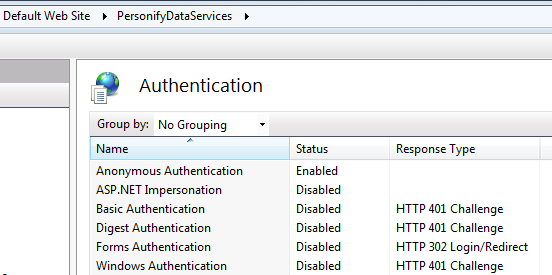
The credentials for authentication will be accepted through “Basic Authentication” (at service level). Any request which does not carry authentication information will be changed dynamically using HTTP status code 401 (written using HttpModule). This is configured as follows:
<system.webServer>
<modules runAllManagedModulesForAllRequests="true">
<add name="PersonifyBasicAuthenticationModule" type="Personify.DataServices.Core.Authentication.PersonifyAuthModule"/>
</modules>
</system.webServer>
As the “Basic Authentication” is dynamic, we can disable all authentication mechanisms for the service in IIS, as shown below:
Read/Write (RW) entities and service operations may maintain “state” across calls. For Read/Write entities, the service stores the TIMSS BusinessObject Collection directly as part of state. The developer has the flexibility to write to “state” when they are developing Service Operations.
The persistence of “state” is managed by a custom component developed using our own provider model. This component/provider (Personify.Persistence.AdoBocStateProvider) is completely different from that of ASP.NET session provider (and we do not use ASP.NET session in Personify Data Services).
Theoretically, we maintain sessions for all users accessing our service and this is managed automatically by our own session ID manager “PersonifySessionIDManager”. This needs to be configured, as shown below:
<sessionState
cookieless="false"
timeout="20"
sessionIDManagerType="Personify.DataServices.Core.PersonifySessionIDManager, Personify.DataServices.Core"
/>
Behind the scenes, our persistence provider always works with SQL Server ASP.NET Session State tables (provided by Microsoft) to store the “state”. The persistence mechanism needs to be configured, as shown below:
<configSections>
<section name="PersonifyBocState" type="Personify.DataServices.Common.ConfigSection.Persistence.PersonifyPersistenceSection, Personify.DataServices.Common" />
</configSections>
<PersonifyBocState
ProviderType="Personify.Persistence.AdoBocStateProvider"
ConnectionString="Data Source=[YourServer];Initial Catalog=AspNetSqlSessionState;User Id=[YourUserId];Password=[YourPassword]"
TimeOut="20"
/>
Personify Data Services is architectured to be customizable. You can start customizing entities using Personify Web Services Designer (WSD). The WSD has the capability of source controlling the entity model modifications.
We can also make our custom entities/service operations available in a different layer (other than the base layer delivered with release). Additionally, we can create multiple layers depending on other layers.
The layering configuration is usually carried through four sections and the default deployment comes with the configuration, as shown below:
<configSections>
<section name="PersonifyDataServicesLayer" type="Personify.DataServices.Common.ConfigSection.PersonifyDataAccessSection, Personify.DataServices.Common" />
.
.
</configSections>
<PersonifyDataServicesLayer Name="ServiceOperationLibraries">
<LayerItem Priority="1" Name="Personify.DataServices.Business.Base" RootNamespace="Personify.DataServices.Business.Base" FileName="Personify.DataServices.Business.Base.dll" />
<LayerItem Priority="2" Name="Personify.DataServices.Business.Generated.Base" RootNamespace="Personify.DataServices.Business.Generated.Base" FileName="Personify.DataServices.Business.Generated.Base.dll" />
</PersonifyDataServicesLayer>
<system.data>
<DbProviderFactories>
<add name="Personify EF Data Provider" invariant="PersonifyEFProvider" description="EF Provider for Personify" type="Personify.DataServices.EF.Provider.PersonifyProviderFactory, Personify.DataServices.EF.Provider, Version=1.0.0.0, Culture=neutral"/>
</DbProviderFactories>
</system.data>
<connectionStrings>
<add name="PersonifyEntitiesBase" connectionString="provider=PersonifyEFProvider;metadata=res://Personify.DataServices.EF.Model.Base/Personify.DataServices.EF.Model.Base.DataModel.PersonifyDataModel.csdl|res://Personify.DataServices.EF.Model.Base/Personify.DataServices.EF.Model.Base.DataModel.PersonifyDataModel.msl|res://Personify.DataServices.EF.Model.Base/Personify.DataServices.EF.Model.Base.DataModel.PersonifyDataModel.ssdl;Provider Connection String='data source=XE;user id=edmuser;password=123456'" providerName="System.Data.EntityClient" />
</connectionStrings>
If we add a new custom layer, the configuration changes for the above would look like the following (highlighted in bold below):
<PersonifyDataServicesLayer Name="ServiceOperationLibraries">
<LayerItem Priority="1" Name="Personify.DataServices.Business.Custom" RootNamespace="Personify.DataServices.Business.Custom" FileName="Personify.DataServices.Business.Custom.dll" />
<LayerItem Priority="2" Name="Personify.DataServices.Business.Generated.Custom" RootNamespace="Personify.DataServices.Business.Generated.Custom" FileName="Personify.DataServices.Business.Generated.Custom.dll" />
<LayerItem Priority="3" Name="Personify.DataServices.Business.Base" RootNamespace="Personify.DataServices.Business.Base" FileName="Personify.DataServices.Business.Base.dll" />
<LayerItem Priority="4" Name="Personify.DataServices.Business.Generated.Base" RootNamespace="Personify.DataServices.Business.Generated.Base" FileName="Personify.DataServices.Business.Generated.Base.dll" />
</PersonifyDataServicesLayer>
<connectionStrings>
<add name="PersonifyEntitiesBase" connectionString="provider=PersonifyEFProvider;metadata=res://Personify.DataServices.EF.Model.Base/Personify.DataServices.EF.Model.Base.DataModel.PersonifyDataModel.csdl|res://Personify.DataServices.EF.Model.Base/Personify.DataServices.EF.Model.Base.DataModel.PersonifyDataModel.msl|res://Personify.DataServices.EF.Model.Base/Personify.DataServices.EF.Model.Base.DataModel.PersonifyDataModel.ssdl;Provider Connection String='data source=XE;user id=edmuser;password=123456'" providerName="System.Data.EntityClient" />
<add name="PersonifyEntitiesCustom" connectionString="provider=PersonifyEFProvider;metadata=res://Personify.DataServices.EF.Model.Custom/Personify.DataServices.EF.Model.Custom.DataModel.PersonifyDataModel.csdl|res://Personify.DataServices.EF.Model.Custom/Personify.DataServices.EF.Model.Custom.DataModel.PersonifyDataModel.msl|res://Personify.DataServices.EF.Model.Custom/Personify.DataServices.EF.Model.Custom.DataModel.PersonifyDataModel.ssdl;Provider Connection String='data source=XE;user id=edmuser;password=123456'" providerName="System.Data.EntityClient" />
</connectionStrings>
If the code for a class (or service operation) exists in more than one dll (mentioned in PersonifyDataServicesLayer element), only one is executed based on the priority set.
Personify Data Services need to be configured to determine how much data can be retrieved per request (to eliminate unnecessary network traffic).
<appSettings>
<add key="QueryWarningLimitLevel" value="1000"/>
<add key="QueryErrorLimitLevel" value="1000"/>
<add key="MaxRowsToFetchWithNoWherePredicate" value="100"/>
<add key="EnableIncrementalDataLoad" value="False"/>
</appSettings>
The configuration parameters used for this functionality in the code above are:
QueryWarningLimitLevel: Query will execute and return the number of records as requested, but when logging is enabled, it will record to the log file that a query returned a result set that exceeded the number of records specified for the warning level.
QueryErrorLimitLevel: When the number of records to be returned by a query exceeds this value, an exception will be raised and the query will return no results.
MaxRowsToFetchWithNoWherePredicate: If a query is executed that does not have a where clause this is the maximum number of rows that will be returned by this query. This value is appended as a SELECT TOP (N) to the query
EnableIncrementalDataLoad: When this option is set to "True", the Personify APIs will perform a SELECT <Column Name List>, instead of a SELECT * request.