Configuring the My Account Home Page Controls
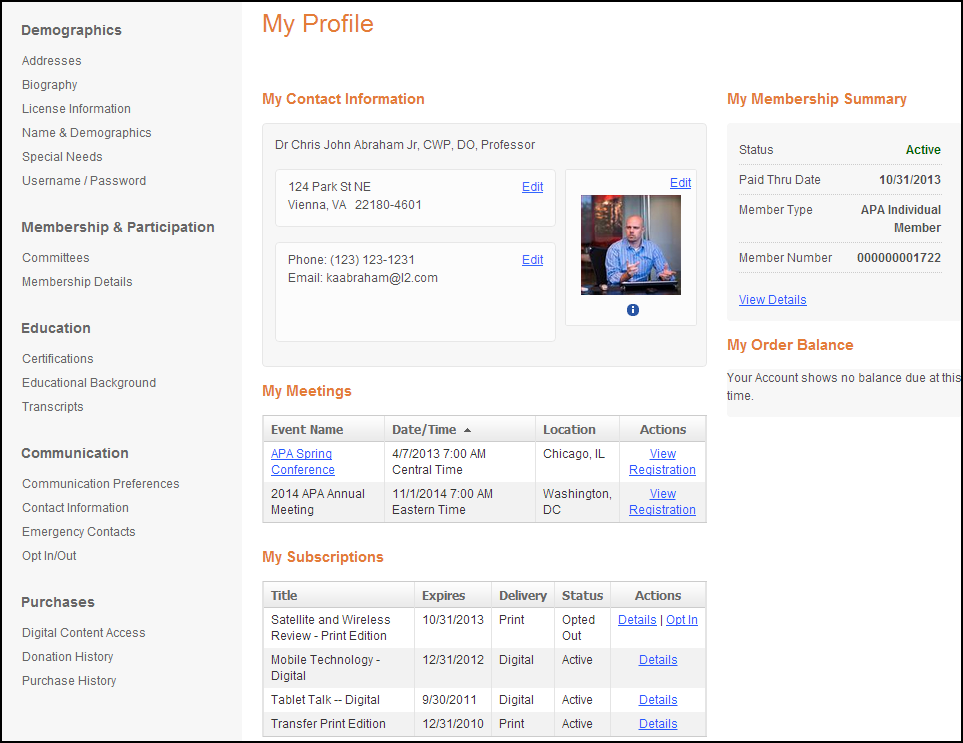
The following controls must be configured in order for your user to view the page as displayed The My Accounts Home Page control (shown below) is comprised of the following individual controls:
1. My Contact Information
2. My Meetings
3. My Subscriptions
4. My Membership Summary
5. My Order Balance
Each of the controls above must be configured in order for your user to view the page as displayed below in the Customer Impact section. The beginning of each control section will have a list of the items that need to be configured in the back office in order for this control to display correctly.
 Many of the system types and codes are used in both the Enterprise (back office) and in the e-Business website. It is important to make sure to web enable in the back office the system types and codes that you want to display on the e-Business website or they will not display on the web.
Customer Impact
After setting up the My Accounts Home Page controls, your user will see the control similar to the one displayed below.