Configuring the Contact Information Controls
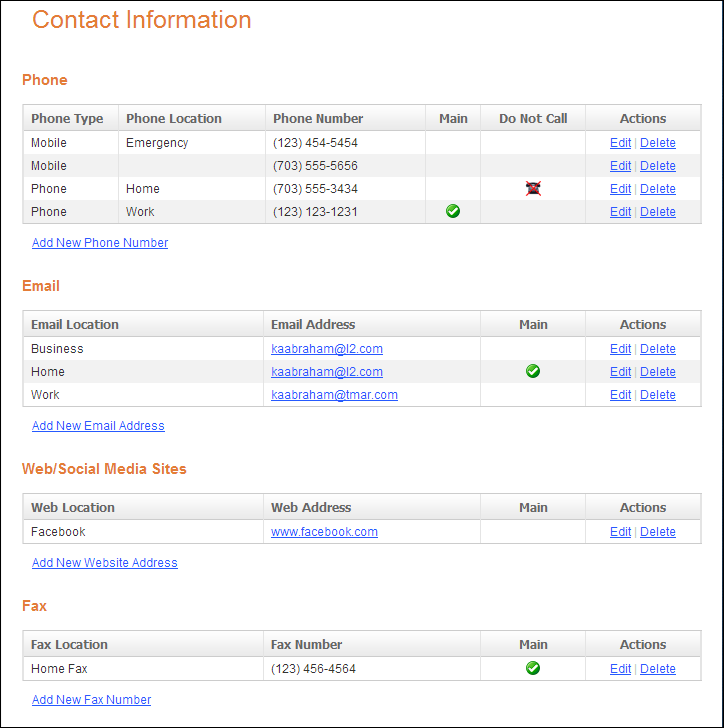
The Contact Information controls are comprised of
the following individual controls:
1. Phone
2. Email
3. Web/Social
Media
4. Fax
These controls allow constituents to view, add, edit, or delete their
phone number(s), email address(es), social media website(s) (i.e., Facebook,
Twitter, and LinkedIn), or a fax number(s) from the e-Business website.
In addition, constituents will be able to indicate whether or not they
want this information to be printed in the directory.
 Many
of the system types and codes are used in both the Enterprise (back office)
and in the e-Business website. It is important to make sure to web enable
in the back office the system types and codes that you want to display
on the e-Business website or they will not display on the web. See Configuring
the Back Office Settings for the Contact Information Controls for
more information on the system types and codes that need to be web enabled
before setting up this control.
Many
of the system types and codes are used in both the Enterprise (back office)
and in the e-Business website. It is important to make sure to web enable
in the back office the system types and codes that you want to display
on the e-Business website or they will not display on the web. See Configuring
the Back Office Settings for the Contact Information Controls for
more information on the system types and codes that need to be web enabled
before setting up this control.
Customer Impact
After setting up the Contact Information controls, your user will see
the controls similar to the one displayed below.