
By default you can create either a left outer, or a right outer join depending on which side of the join the outer table is designated. You can also create a full outer join by activating ANSI 92 support for joins in the universe. This is achieved by setting a universe SQL parameter ANSI 92 to YES (File > Parameters > Parameter). This allows the universe to support ANSI 92 syntax for joins, and you can select the tables on either side of a join to be outer tables. Refer to the section Defining a Full Outer Join for information on creating full outer joins.
The tables Resort_Country and Resort below are linked by an equi-join.
Each resort belongs to a country, but each country may not have a resort. If you use an equi-join, the result set of a query would only show information on the countries that have a resort; Australia, France, and the US.
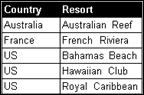
However, you may wish to show all countries irrespective of an equivalent value in the foreign key of the Resort table. To achieve this you define an outer join so that all counties are returned, despite having no match in the Resort column, as shown below:
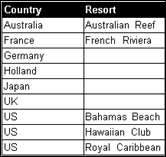
The syntax (Microsoft Access) for the outer join is as follows:
SELECT
Resort_Country.country,
Resort.resort
FROM
Country Resort_Country,
Resort,
{ oj Resort_Country LEFT OUTER JOIN Resort ON
Resort_Country.country_id=Resort.country_id }
 The
example above uses Microsoft Access, so any one-to-many joins following
the table Resort, would also have to have to use outer joins. If not,
then a NULL returned by the original outer join, will not be taken into
account if there is no matching NULL returned by following joins. The
treatment of outer joins is RDBMS specific, so refer to your RDBMS documentation
for information. See also the section Restrictions
for the Use of Outer Joins for more information on restrictions using
outer joins.
The
example above uses Microsoft Access, so any one-to-many joins following
the table Resort, would also have to have to use outer joins. If not,
then a NULL returned by the original outer join, will not be taken into
account if there is no matching NULL returned by following joins. The
treatment of outer joins is RDBMS specific, so refer to your RDBMS documentation
for information. See also the section Restrictions
for the Use of Outer Joins for more information on restrictions using
outer joins.