 For
information on setting this parameter and other SQL generation parameters
for the universe, refer to the section Setting
SQL Generation Parameters.
For
information on setting this parameter and other SQL generation parameters
for the universe, refer to the section Setting
SQL Generation Parameters.
You can define an outer join using the ANSI 92 standard for defining outer joins. This allows you to specify a full outer join. To use the ANSI 92 standard for outer joins, you must set the ANSI 92 parameter to YES. This parameter is available on the Parameter page (File > Parameters > Parameter).
For
information on setting this parameter and other SQL generation parameters
for the universe, refer to the section Setting
SQL Generation Parameters.
When the ANSI 92 parameter has been set to YES, you can select the tables on both sides of the join to be outer tables. Before setting this parameter, you must ensure that your target RDBMS supports the ANSI 92 syntax for outer joins.
You define a full outer join in two phases:
· Activate ANSI 92 support for outer joins for the universe. See the section Activating ANSI 92 Support in a Universe for information.
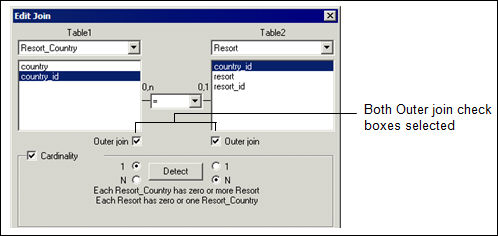
· Use the Edit join dialog box to define the full outer join.
To define a full outer join:
1. Activate ANSI 92 support for the universe.
2. Double
click a join in the schema.
The Edit Join dialog box appears.
3. Select
the Outer Join check box for both tables included in the join as shown
below.
4. Click
OK.
Designer displays the join in the Structure pane. The full outer join is
indicated by two circles on the join link between two tables.