Adding Individual Award Program Reviewers
To add an individual as a reviewer:
1. From
the Manage Awards Programs screen,
if you selected “Individual” from the Reviewer
Type drop-down list, on the Reviewers tab, click Add.
The Choose a Reviewer window displays.
2. Search
for and select the appropriate customer.
The Awards Program Reviewer window display with the Contact Information
of the selected customer, as shown below.
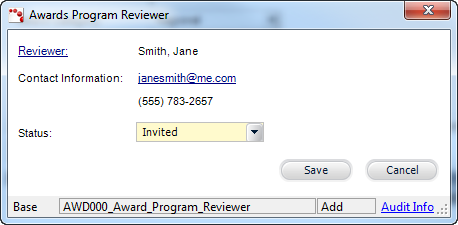
 If
you would like to change the customer selected as the reviewer, click
the Reviewer link to search for and select a new customer.
If
you would like to change the customer selected as the reviewer, click
the Reviewer link to search for and select a new customer.
3. Select
the Status from the drop-down.
4. Click
Save.
5. Repeat
as necessary to add additional reviewers. There is no limit to the amount
of reviewers for an awards program.
Once
reviewers have been added to the awards program, the Reviewer Type cannot
be changed to Committee.
Screen Element |
Description |
Add |
Button.
When clicked, displays the Choose a Reviewer window where you
can select the individual designated as the reviewer for the awards
program. |
Edit |
Button.
When clicked, the reviewer selected is displayed in the Awards
Program Reviewer window for editing. |
Delete |
Button.
When clicked, the reviewer selected is deleted from the grid. |
Awards Program Reviewer window |
Reviewer |
Link.
When clicked, displays the Customer Chooser where you can select
a different individual designated as the reviewer for the awards
program. |
Contact Information |
Read-only.
Displays the primary email and phone number of the selected reviewer.
You can click the email link to open the Email window and send
an email to the reviewer. |
Status |
Drop-down.
Displays the status of the reviewer. For example, Invited, Confirmed,
or Declined. Values are populated based on the non-fixed AWD "REVIEWER_STATUS"
system type. |
Save |
Button.
When clicked, the Awards Program Reviewer window is closed and
the reviewer record is saved and added to the grid on the Reviewers
tab. |
Cancel |
Button.
When clicked, the Awards Program Reviewer window is closed and
the reviewer record is NOT saved. |
|