Adding Award Program Recognition
When a nominee wins an award, they are usually granted
some sort of recognition. This may be a plaque or certificate, a cash
amount, a product (e.g., lifetime membership), or acknowledgment at an
awards dinner. Some of these items may be provided by a sponsor.
Multiple forms of recognition can be defined per award,
and levels can be established for tracking purposes. For example, an awards
program may include First, Second, Third, and Honorable Mention, each
receiving its own recognition.
Recognition is typically added after the nomination
period is over, the award is no longer displayed on the web, and the nominations
have been reviewed. Nominators via the web and back-office will not know
what specific recognition will be given for each award.
 The
prize itself is just a description. Even if a product is linked, Personify
will not automatically fulfill it. For example, if the prize is lifetime
membership, an order for the “Lifetime Membership” product will not be
created automatically. This must be manually done in the back-office.
The
prize itself is just a description. Even if a product is linked, Personify
will not automatically fulfill it. For example, if the prize is lifetime
membership, an order for the “Lifetime Membership” product will not be
created automatically. This must be manually done in the back-office.
To add recognition(s) to an awards program:
1. From
the Manage Awards Programs screen,
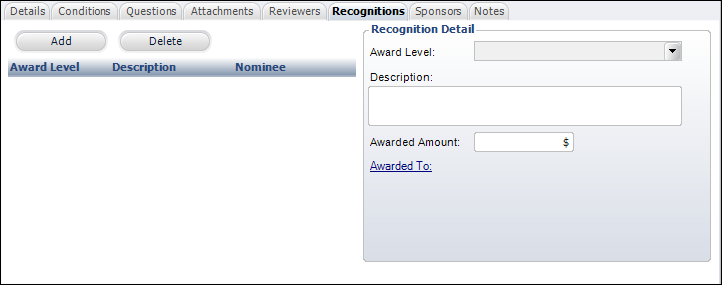
from the Recognition tab, click Add.
2. From
the Recognition Detail section, select the Award
Level from the drop-down.
For example, First Place, Second Place, or Third Place.
3. Enter
the recognition Description.
4. If
necessary, enter the Awarded Amount.
5. If
necessary, click the Awarded To
link to search for the customer in which the recognition is intended for.
6. Click
Save.
7. Repeat
as necessary to add additional recognitions.
There is no limit to the amount of recognitions for an awards program.
Screen Element |
Description |
Add |
Button.
When clicked, the fields in the Recognition Detail section are
enabled. |
Delete |
Button.
When clicked, the select award recognition is deleted.
After an award has been granted,
if a change needs to be made to an award level, the nominee(s)
record(s) must first be deleted. |
Recognition Detail |
Award Level |
Drop-down.
Indicates the unique user-defined award level. Values are populated
based on the non-fixed AWD "RECOGNITION_LEVEL" system
type. |
Description |
Text
box. Displays the award recognition description. |
Awarded Amount |
Text
box. Displays the monetary recognition amount, if applicable. |
Awarded To |
Link.
When clicked, displays the Customer Chooser where you can select
to who the award was given. |
|