 The
answer fields are text only and are not mapped to any pre-existing Personify
fields.
The
answer fields are text only and are not mapped to any pre-existing Personify
fields.
Each award can also includes a unique set of nomination questions that a user must answer when nominating a candidate. The Questions tab allows the user to create these questions and establish their sort order. A question category code is included to allow the award administrator to group the questions into sections on an interactive web form. You can choose whether or not answering any question is a requirement for submitting a nomination.
The
answer fields are text only and are not mapped to any pre-existing Personify
fields.
To add questions to an awards program:
1. From
the Manage Awards Programs screen,
from the Questions tab, click Add.
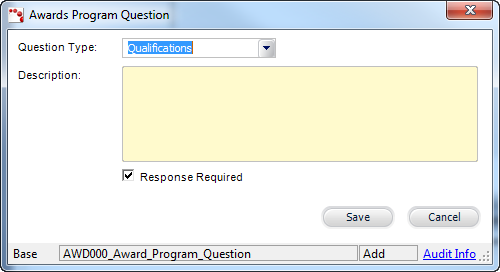
The Awards Program Questions window displays, as shown below.
2. Select
the Question Type from the drop-down.
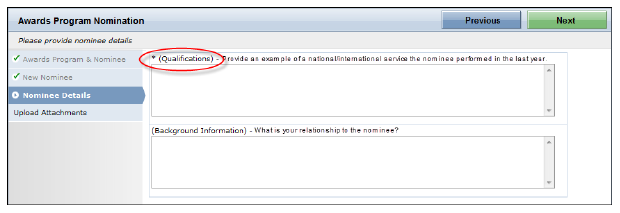
The question & answer form displayed on the online nomination form
and the Nomination Response screen will automatically group questions
according the Question Type selected.
3. Enter the Description of the question.
4. By default, the Response Required checkbox is selected. If necessary, deselect the Response Required checkbox.
Questions
that are defined as required will be displayed with an asterisk (*) on
the online nomination form.
5. Click Save.
6. Repeat as necessary to add additional questions. There is no limit to the amount of questions you can enter for an awards program.
Use
the up and down arrows to the right of the Delete button to order how
you want the questions to display for answering.
| ||||||||||||||||||||||||