 Personify
does not automatically validate any conditions. Conditions can be automated
with a modification that is specific to the organization’s process.
Personify
does not automatically validate any conditions. Conditions can be automated
with a modification that is specific to the organization’s process.
Many awards programs have prerequisites or requirements, known as conditions, that a nominee must meet before they can be considered for the award. For example, the nominee must have worked ten years in the industry or held X membership for five years. These conditions are specified by staff and carry over to the Award Nomination screen for review and validation. At some organizations, staff reviews each nominee’s eligibility prior to sending nomination packets to reviewers for a decision. Nominations may be received for nominees that do not meet these eligibility requirements.
Conditions are added during the awards program setup process and the Conditions tab allows the organization to define as many conditions as they want.
Personify
does not automatically validate any conditions. Conditions can be automated
with a modification that is specific to the organization’s process.
All required fields must be filled out in the Manage Awards Programs section and on the Details tab before you can add conditions.
To add a condition to an awards program:
1. From
the Manage Awards Programs screen,
access the Conditions tab.
The Conditions tab displays a list of conditions that have been defined
for the awards program. To edit an existing condition, select the condition
from the list and click Edit.
2. Click
Add.
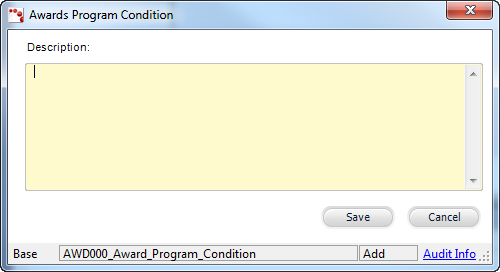
The Awards Program Condition window displays, as shown below.
3. Enter
the condition Description.
This description will be displayed on the Conditions tab on the Award Nominations
screen.
4. Click
Save.
The condition is added to the Conditions tab.
5. Repeat
as necessary to add additional conditions.
There is no limit to the amount of conditions for an awards program.
Screen Element |
Description |
|---|---|
Add |
Button. When clicked, displays the conditions window where you can enter a new condition for the awards program. |
Edit |
Button. When clicked, the condition selected is displayed in the Awards Program Condition window for editing. |
Delete |
Button. When clicked, the condition selected is deleted from the grid. |
Awards Program Condition |
|
Description |
Text box. Indicates the prerequisites or requirements that a nominee must meet before they can be considered for the award. The system will NOT check to see if the conditions have been met.
|
Save |
Button. When clicked, the Awards Program Condition window is closed and the condition record is saved and added to the grid on the Conditions tab. |
Cancel |
Button. When clicked, the Awards Program Condition window is closed and the condition record is NOT saved. |