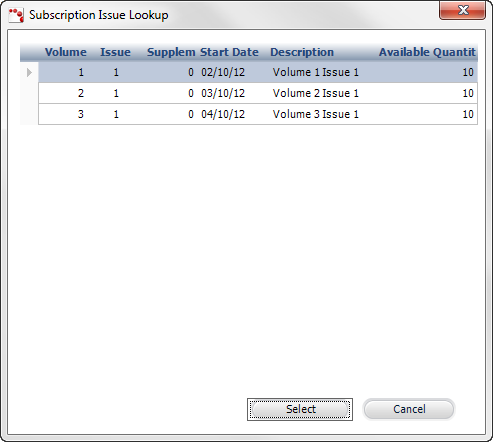
The Subscription Issue Lookup screen displays, as shown below.
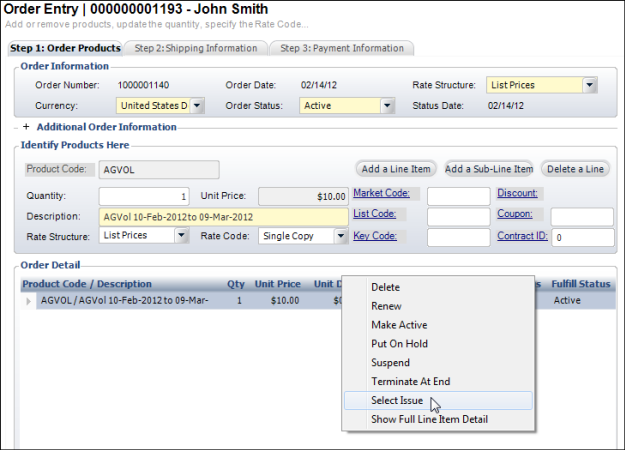
As of 7.4.1, if you want to allow an order to be placed for a single issue of a subscription product, the following must be setup:
· From the Types and Codes Maintenance screen, a code of "SINGLE" must be created for the "RATE" system type. In the Option 1 column, labeled Enter SC for single-copy rates, enter "SC".
· From the Product Maintenance - Rates and Pricing screen, a rate code must be defined for "SINGLE". Additionally, from the Rate Code Extensions screen, the No of Issues must be "1".
· From the Product Maintenance - Issue Maintenance screen, at least one issue must have an Available Quantity greater than zero.
To create an order for a single issue:
1. From the Order Entry screen, add the subscription product to the order.
2. From the Rate Code drop-down, select "SINGLE".
3. Right-click
the subscription product line item and click Select
Issue, as shown below.
The Subscription Issue Lookup screen displays, as shown below.
4. Select the appropriate issue and click Select.
5. Add Additional Information, Define Shipping Information, and Create a Receipt.