The Notification Process Details search screen displays, as shown below.
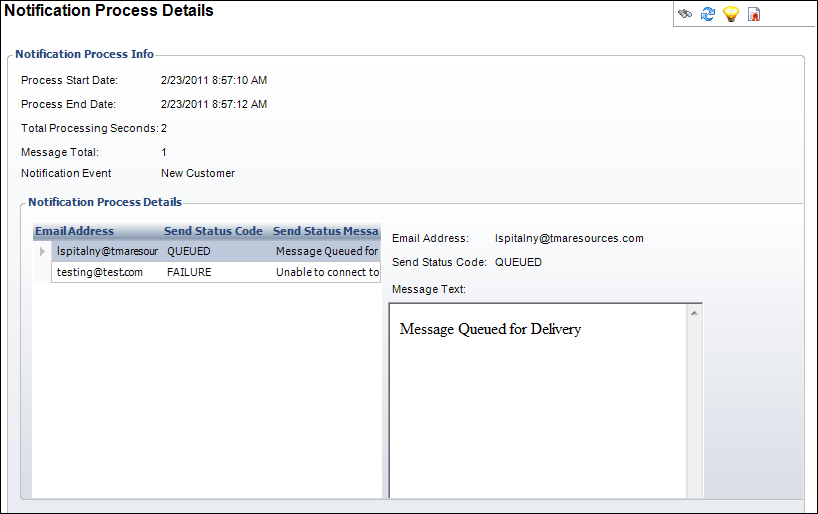
When the notification service begins to process each message, it creates a record of the various steps of the process. When the message completes (either successfully or unsuccessfully) a row is added to indicate the message completion status. This screen is read-only.
To view the notification process:
1. From
the toolbar, select System Admin > Notification
Services > Notification Process Maintenance.
The Notification Process Details search screen displays, as shown below.
2. Perform
a search, by date, for the process whose information you want to view.
The Notification Process Details screen displays.
Screen Element |
Description |
|---|---|
Notification Process Info |
|
| Process Start Date | Read-only. Displays the date and time the notification event began. |
| Process End Date | Read-only. Displays the date and time the notification even completed. |
| Total Processing Seconds | Read-only. The difference in seconds between the Processing End Date and Processing Start Date. |
| Message Total | Read-only. The total number of messages sent by this notification event. |
| Notification Event | Read-only. The Parent ID populated from the NTS_NOTIFICATION table. |
Notification Process Details |
|
| Email Address | Read-only. The email address of the recipient of the notification email. |
| Send Status Code | Read-only. This code indicates the success/failure of the action performed on the email message. |
| Message Text | Read-only. This is the status message that provides additional information about the action performed on the mail message during this notification event. |