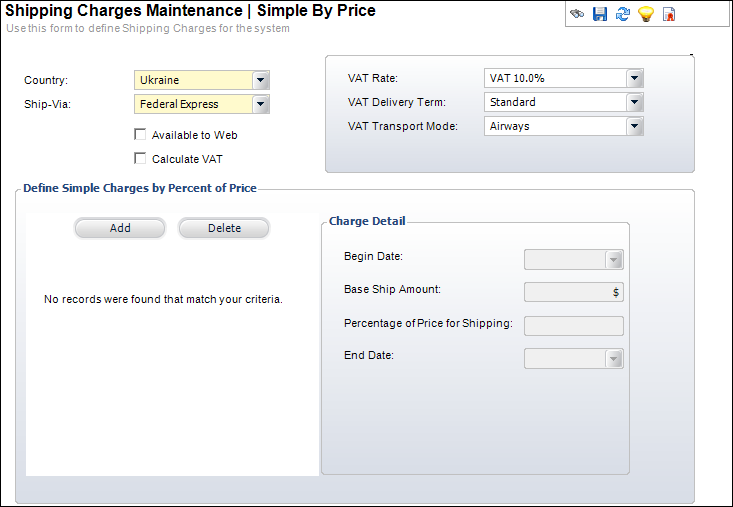
The Shipping Charges Maintenance – Simple by Price screen displays, as shown below.
Price-based shipping calculations are calculated at the line level based on the percentage of price and are NOT prorated like the other calculation methods.
To define shipping charges by price:
1. On
the Shipping Charges Maintenance
screen, from Define Shipping Charges task category, click Simple
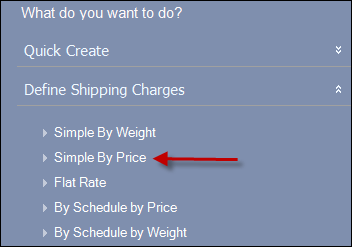
By Price, as highlighted below.
The Shipping Charges Maintenance – Simple by Price screen displays, as
shown below.
2. Click
Add.
The Define Simple Charges By Percent of Price table contains a new row.
3. Select
the effective begin date for the shipping charges defined from the Begin Date drop-down.
This shipping method will be charged if the order date is on or after the
begin date.
4. In
Base Ship Amount field, enter
the minimum shipping amount that will be charged regardless of product
weight per order per ship-via.
For example, if an order has three line items, two being shipped via FedEx
and one being shipped via UPS, then the Base Ship Amount defined for the
FedEx will be split between the two lines, AND
the Base Ship Amount for UPS will be applied to the third line.
5. In Percentage of Price for Shipping field, enter the percentage of the order total applied to shipping the product per ship-via.
6. In the Amount Charged per Unit Weight field, enter the amount of money charged to every order per unit weight.
7. Select
the effective End Date for the
shipping charges defined from the drop-down.
This shipping method will be charged if the order date is before the End
Date.
8. Click Save.