 This
section only discusses running INV620. Please see the Performing
Shipping Maintenance for more information on INV200.
This
section only discusses running INV620. Please see the Performing
Shipping Maintenance for more information on INV200.
The Shipping Maintenance (INV200) screen varies from INV620 in that INV200 is a screen within Personify where you can manually generate Pick Lists and packing slips; print labels, invoices, and bad addresses; or mark products as back order. The INV620 process, on the other hand, is a batch job that automatically performs the tasks you manually do from INV200 depending on which parameters you set for INV620.
This
section only discusses running INV620. Please see the Performing
Shipping Maintenance for more information on INV200.
INV620 checks to see if an Inventoried product is available for shipment. If so, depending on your INV620 parameters, the process generates the product’s packing slip, finalizes shipping, and generates an invoice.
When you create an Inventoried product deferred receipt to be paid by credit card, you request authorization for the credit card payment. Before INV620 can generate a packing slip and finalize shipping, the process must confirm that the credit card authorization for the Inventoried product receipt did not expire. Credit card authorizations are only valid for a pre-determined amount of days set by the credit card company.
By default, Personify authorizes credit cards for eight days; however, if your credit card processors authorize credit cards for a different amount of time, you must configure your Personify application on the Configure and Verify Interfaces (APP014) screen to match your credit card processors. For more information, please see Personify Universal Payment Handler Interface.
In the case that the credit card authorization expires before INV620 confirms the product for shipment, the process issues a new authorization before generating the packing slips. If the authorization does not go through (i.e., the credit card is declined), then, on the basis of the STOP_SHIPPING_ON_REJECT parameter you set, the system decides whether to ship the product or put it on HOLD. The INV620 report groups these declined credit card orders on HOLD in a separate report output. For more information on declined credit cards, please refer to Credit Cards Declined During Shipping.
To run the INV620 process:
1. From
the toolbar, select Reporting > Batch
Job Submission.
The Job Submission search screen displays.
2. Enter
“INV620” in the Application field and click Search.
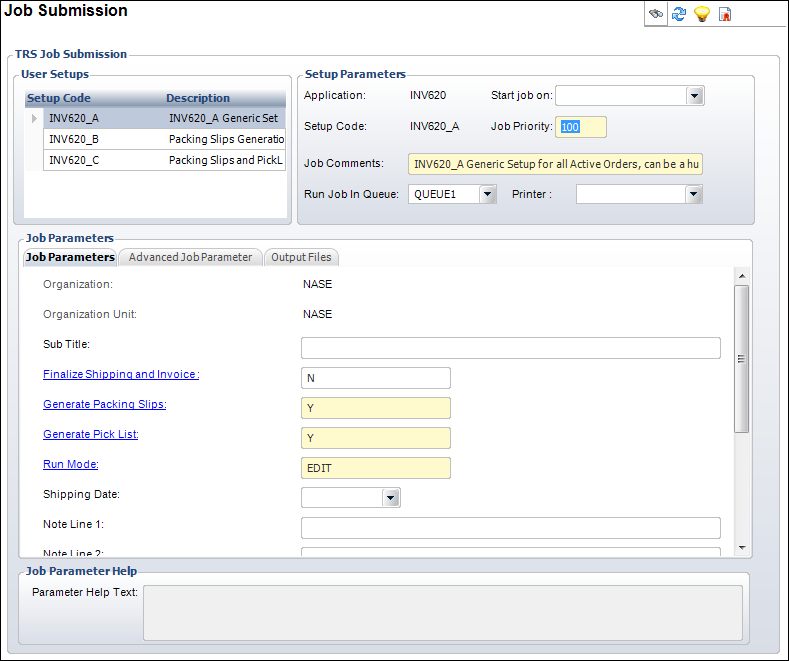
The Job Submission screen opens automatically with the INV620 report displays,
as shown below.
3. Click
one of the three options (INV620_A, INV620_B, and INV620_C) in the User
Setups section. Refer to the Job Comments section for more information
on each setup.
The INV620 process default job parameters display depending on which option
you choose.
The
three options only represent three different default parameter setups
for INV620. You can select any of the three and modify the parameters
to meet your needs.
4. Enter the desired job parameters.
5. To
mark orders as “Shipped,” enter “Y” for Finalize
Shipping and Invoice.
If you plan to manually finalize shipping from the Shipping Maintenance
(INV200) screen before capturing receipts with CCP610, enter “N.”
CCP610
can only convert deferred receipts to actual receipts that have a Fulfill
Status of “Shipped” or “Pre-Shipped.”
6. Click
Submit to TRS Server from the
TRS Tasks task category.
When the process completes, select the Output tab, select the report, and
click View Report Output to view the report.
INV620 can create a variety of reports depending on the process’ findings.
Options include Invoice List, Pick List, Packing Slip List, Bad Address
List, and Pre-Auth Error List.
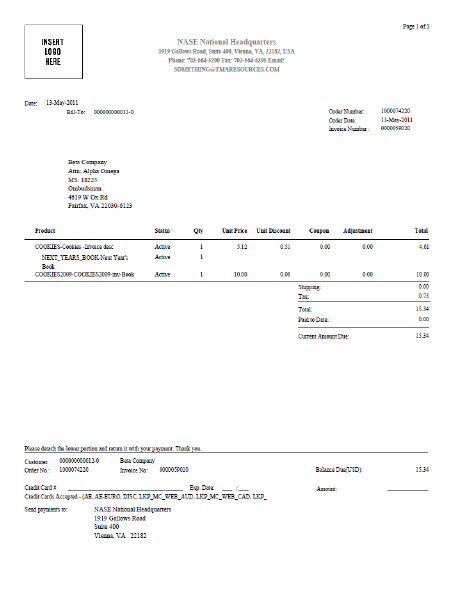
A sample of an INV620 Invoice appears below.
Some credit cards may be declined when you run INV620. The Pre-Auth Error report lists such transactions. The cause for decline could be because the authorization expired or the credit card itself expired. In these cases, the status of the deferred receipt and credit card payment depends on the value you set for the STOP_SHIPPING_ON_REJECT parameter on the System Parameter Maintenance (APP008) screen.
For more information regarding declined credit cards and setting the STOP_SHIPPING_ON_REJECT parameter, please refer to Credit Cards Declined During Shipping.