When you try to ship a product using INV200 or INV620, and the credit card is declined, you receive a pre-authorization error that states “There are records for which pre-authorization failed.”
The status of a deferred receipt after its credit card is declined depends on the setting of your STOP_SHIPPING_ON_REJECT parameter on the System Parameter Maintenance (APP008) screen.
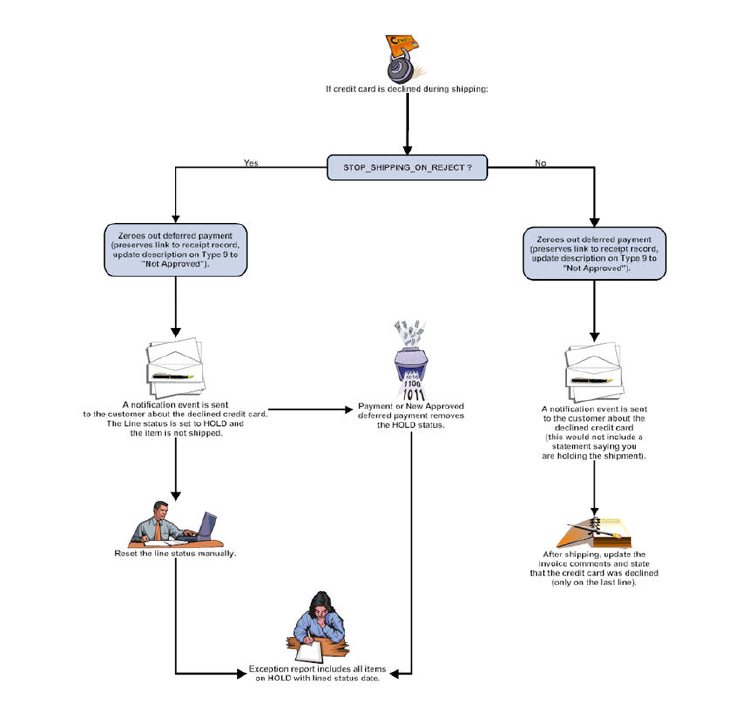
The flow chart below details the possible paths for your receipt if the credit card is declined.
Two situations arise when a credit card is declined:
1. Shipment
of the inventory item stops.
This occurs if your STOP_SHIPPING_ON_REJECT parameter is set to “Y.”
2. The
inventory item ships and an invoice generates with a comment on it explaining
why the credit card was declined.
This occurs if your STOP_SHIPPING_ON_REJECT parameter is set to “N.”
If the credit card is declined and your STOP_SHIPPING_ON_REJECT parameter is set to “Y,” the Line Status on the order changes from “Active” to “Hold” and the line_status_date updates with the current date.
 Items
on hold are not available in the INV200 screen and cannot be selected
by INV620.
Items
on hold are not available in the INV200 screen and cannot be selected
by INV620.
From the Order Entry screen, click Show Full Line Item Detail from the Work with Line Items task category to view the Line Status as “Hold.”
When the customer makes a payment or a new approved deferred payment is entered, the Line Status changes from “Hold” to “Active.” The payment is received and the order balance is $0.
Regardless of the STOP_SHIPPING_ON_REJECT parameter setting, the line shows the Balance Due, the deferred payment zeroes out, and the description updates to “Not Approved.” A notification event is also sent to the customer about the credit card decline.