TMA Resources has implemented the second phase of Payment Application Data Security Standard (PA-DSS) within Personify. Previously, Personify tracked credit card transactions by recording the encrypted credit card numbers. Now Personify no longer stores credit card numbers to protect against credit card theft, and instead only stores the first six digits and the last four digits of the credit card number.
Personify now performs the transaction through a Payment Gateway and only stores the transaction number or token. Payment Gateways include PayPal’s Payflow Pro (formerly VeriSign) or CyberSource. The transaction number or token is used for all transactions, including new authorizations, settlements, and refunds.
To configure Payflow Pro for PA-DSS:
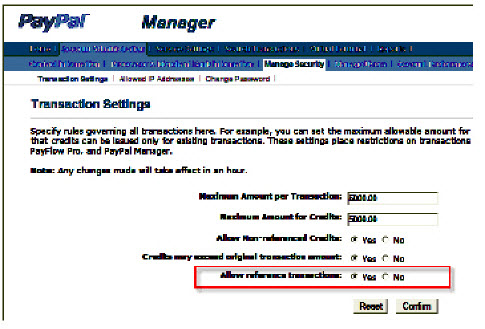
1. If you use Payflow Pro, the reference transactions are disabled as a security measure, so you will need to enable the reference transactions. To enable the reference transactions:
a. Log on to https://manager.paypal.com.
b. Enter you login information.
c. Select
Account Administration > Manage
Security > Transaction Settings from the toolbar. The Transaction
Settings screen displays, as shown below.
d. For the Allow Reference Transactions field, select the “Yes” radio button.
e. Click Confirm.
2. Remove the “Keys” folder along with any files from the Application and TRS Servers.