 If
a prospect becomes a customer, the customer ID does note update automatically;
however, if you add the new customer to any list in the future, the customer
information passed to Lyris.
If
a prospect becomes a customer, the customer ID does note update automatically;
however, if you add the new customer to any list in the future, the customer
information passed to Lyris.
To use the segmentation feature of Lyris ListManager Pro or Enterprise editions, you must create a master list of all customers and/or prospects to whom you want to market and send it to Lyris. This is done on the Marketing List Maintenance (MKT002) screen in Personify.
If
a prospect becomes a customer, the customer ID does note update automatically;
however, if you add the new customer to any list in the future, the customer
information passed to Lyris.
To create the master list:
1. From the toolbar, select Marketing > List Maintenance
2. Click
Create New.
The General List Information screen displays, demonstrated in the screen
below.
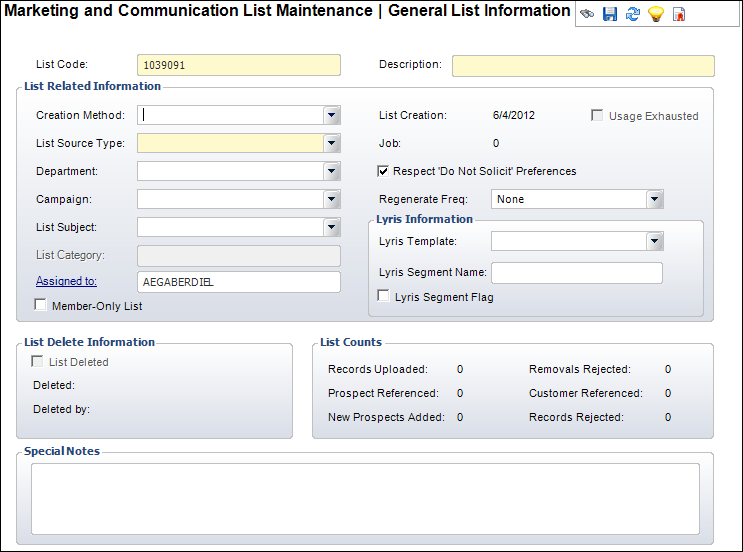
3. Enter PERSONIFY_ALL_CUSTOMERS in the List Code text box.
4. Enter
a description of the list code.
For example, “List of all Personify customers.”
5. Select
“Predefined Query” as the Creation Method
type.
The List Source Type defaults to
“TIMSS Internal.”
6. Select the Regeneration Frequency.
7. Enter information in the Department, Campaign, List Category, and Assigned to fields as necessary.
8. Click Save.
After creating a list, you have to populate that list with your Personify customers. This is done by using the MKT600 batch job.
To run the MKT600 batch job:
1. From
the toolbar, select Reporting > Batch
Job Submission.
The Job Submission screen displays.
2. Search
for and select the MKT600 application.
The Job Submission screen for that process displays like the following.
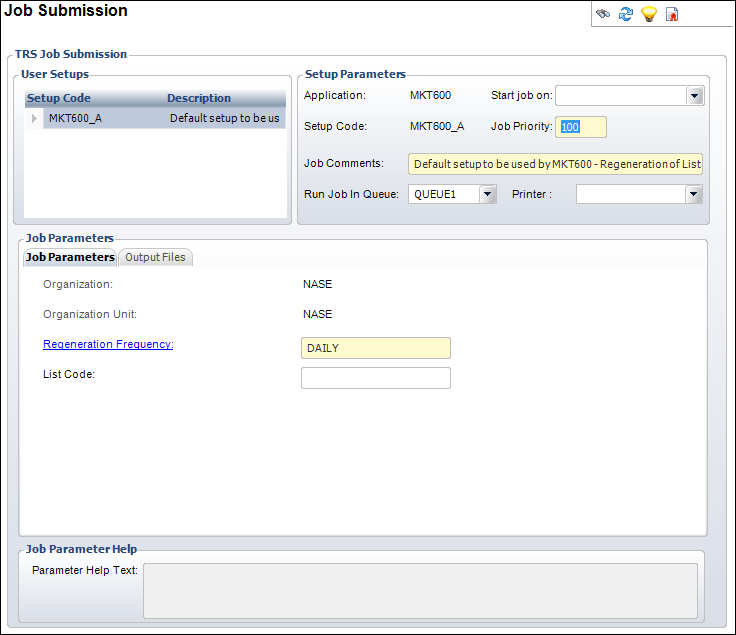
3. Click
the Regeneration Frequency link.
The Generic Chooser displays. Select the Regeneration Frequency code. When
the MKT600 job is run, it will only populate lists with the same Regeneration
Frequency code.
4. If necessary, enter the List Code (e.g., PERSONIFY_ALL_CUSOTMERS) for the specific list you want this job to populate.
5. From the TRS Tasks task category, click Run this report now.
6. After running the MKT600 job, from the toolbar, select Marketing > List Maintenance.
7. Search for and select the list for which you ran the MKT600 job.
8. From the List Maintenance task category, click the Send the List to Lyris link.
If,
in the future, you update or regenerate a member record in your master
list, only the new/changed information passes to Lyris to update the existing
member record, not the entire master list.