 This
screen is enabled only when the Zip Linked checkbox is selected for the
Level 1 structure.
This
screen is enabled only when the Zip Linked checkbox is selected for the
Level 1 structure.
For chapters or other groups specific to a location, this is used to map the country code, state or province, and postal code that is valid for a specific membership product. In the Order Entry application, when a membership product that uses a Level 1 where the Include Zip Linked checkbox is selected, the system automatically pulls all other products that are “Zip Linked” with the same parent product code into the order as sub-products of the line item.
This
screen is enabled only when the Zip Linked checkbox is selected for the
Level 1 structure.
Organizations that base chapter affiliation on regions or states can create chapter products based on zip code ranges and automate the assignation of appropriate chapters via postal mapping.
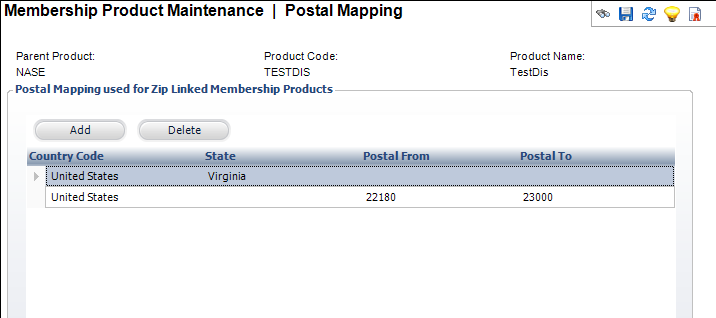
In the Postal Mapping grid below, the first example in row one just uses the state, which will include all postal codes for the state. The second example in row two shows a particular postal code range, which could be for the whole state or different divisions of the state, such as city or county. Another example (not shown in the image below) is for international regions. These will only required single or multiple rows with only the Country Code selected.
To define the postal mapping:
1. Click
Postal Mapping from the Subsystem
Specific task category.
The Postal Mapping screen displays, as shown below.
2. Click Add.
3. Select the Country Code from the cell drop-down.
4. Select the State from the cell drop-down.
5. Enter the Postal From and Postal To values.
6. Click Save.
Screen Element |
Description |
|---|---|
Add |
Button. When clicked, a row is added to the Postal Mapping table and the corresponding fields are enabled to add a postal mapping. |
Delete |
Button. When clicked, the highlighted row from the table and the postal mapping are deleted. |
Country Code |
Table column drop-down. Select the country from the list. |
State |
Table column drop-down. Select the state from the list. |
Postal From |
Table column text box. Enter the Postal code range starting value. |
Postal To |
Table column text box. Enter the Postal code range end value. |