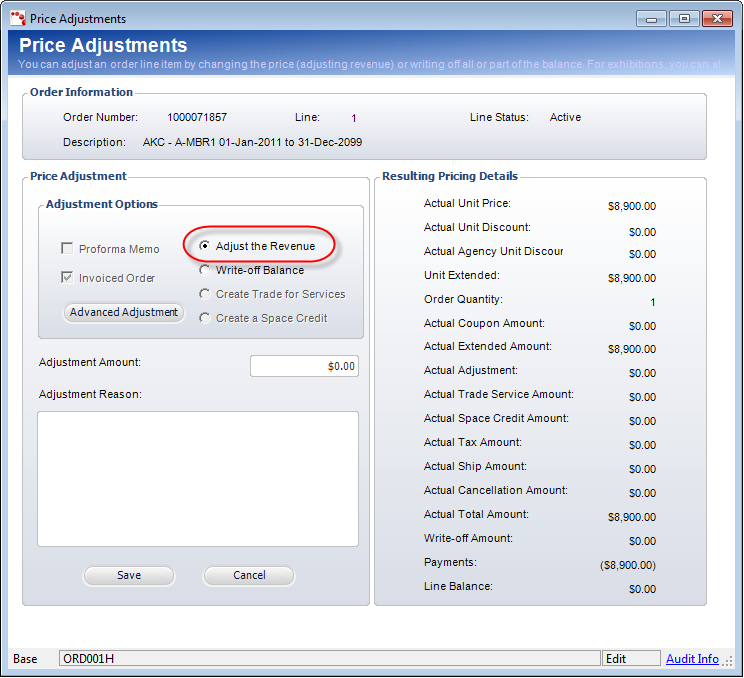
The Price Adjustments screen displays, as shown below.
You can adjust the price of a membership by changing the order Line Amount on the membership order. Doing so creates a debit/credit transaction on the order. The price of a membership product can be adjusted for proforma orders, active orders, and orders in which any payment has been received.
To adjust the revenue of a membership:
1. From the Order Entry screen, select the appropriate line item.
2. From the Work
with Line Items task category, click Adjust Price.
The Price Adjustments screen displays, as shown below.
3. From the Adjustment Options section, select the Adjust the Revenue radio button, as highlighted above.
 If
the order is active, the Invoiced Order checkbox is selected and cannot
be edited. If the order is proforma, the Proforma Memo checkbox is selected
and cannot be edited.
If
the order is active, the Invoiced Order checkbox is selected and cannot
be edited. If the order is proforma, the Proforma Memo checkbox is selected
and cannot be edited.
4. Enter the Adjustment Amount.
5. Enter the Adjustment Reason (required).
6. Click Save.