 Click
here to access the DNN Online Help.
Click
here to access the DNN Online Help.
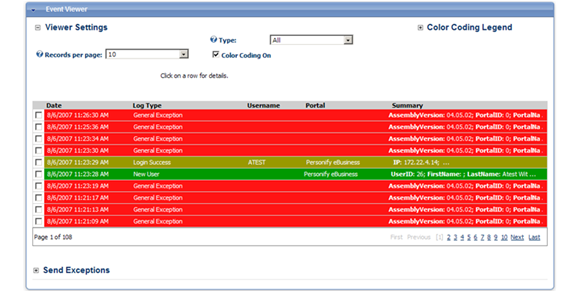
The Event Viewer in Personify e-Business allows you to view the log of system (portal) events, such as login attempts, general exception errors, etc.
Click
here to access the DNN Online Help.
With the implementation of PA-DSS certification in Personify, it is required that you set up a number of Log Types. These Log Types are then stored in the PADSS database for security purposes. Keeping the event logs allows you to view a history of web site changes, data access, etc.
To allow the log types to be recorded in another database:
1. From
your DNN database, open the SQL script “PADSS_ClientScript.sql” and change
the ALTER DATABASE name to your database’s name:
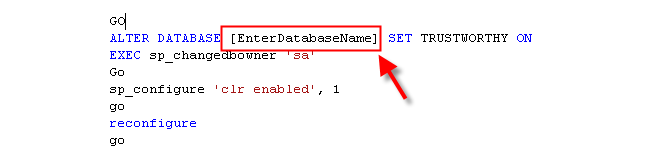
2. Enter
your Web Reference URL:

The
Web Reference URL is stored in:
select * from
personifysetting where PersonifySettingName = ‘PersonifyLogURL’
3. Run the SQL script “PADSS_ClientScript.sql” against your DNN database.
If
you have not run this script or if the PADSS database is down, the Admin/Host
will not be able to log-in to the site. The Admin/Host user will receive
the error message: “PADSS Audit Log is not setup - please check your configuration.”
You
will need System Administrator privileges to run the SQL script.
To access the Event Viewer:
1. From the toolbar, select Admin > Event Viewer.
The Event Viewer page appears as shown below.
2. Click
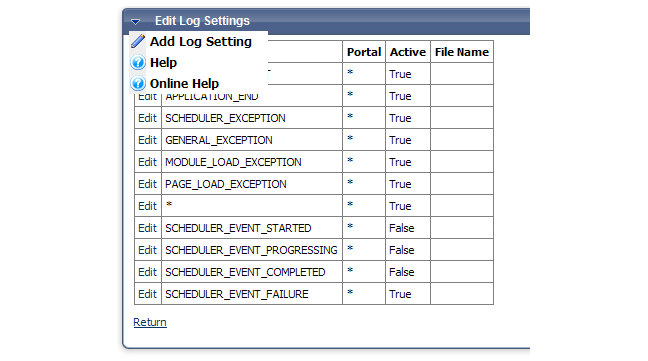
Edit Log Settings.
The Edit Log Settings screen displays as shown below.
3. Click
Add Log Setting.
The Logging Settings screen displays as shown below.
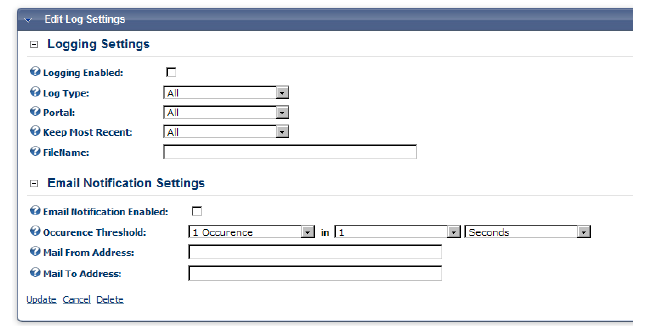
4. In the Log Type drop-down is a list of all the Log Types available through DNN. Refer to the following table to see which of these tables are required for PADSS certification:
DotNetNuke
allows a wild card option (*) to enable logging for all events.
Log Key |
Log Friendly Name |
Log Type |
PADSS Required? |
|---|---|---|---|
| ADMIN_ALERT | Admin Alert | AdminAlert | Y |
| APPLICATION_END | Application Ended | GeneralAdminOperation | N |
| APPLICATION_SHUTTING_DOWN | Application Shutting Down | GeneralAdminOperation | N |
| APPLICATION_START | Application Started | GeneralAdminOperation | N |
| CACHE_REFRESHED | Cache Refreshed | GeneralAdminOperation | N |
| DEBUG | Debug Info | GeneralAdminOperation | N |
| GENERAL_EXCEPTION | General Exception | Exception | N |
| HOST_ALERT | Host Alert | HostAlert | Y |
| LOG_NOTIFICATION_FAILURE | Log Notification Failure | OperationFailure | N |
| LOGIN_FAILURE | Login Failure | OperationFailure | Y |
| LOGIN_SUCCESS | Login Success | OperationSuccess | Y |
| LOGIN_SUPERUSER | Login Success | OperationSuccess | Y |
| LOGIN_USERLOCKEDOUT | User Locked | OperationFailure | Y |
| LOGIN_USERNOTAPPROVED | User Not Approved | OperationFailure | Y |
| MODULE_CREATED | Module Created | ItemCreated | Y |
| MODULE_DELETED | Module Deleted | ItemDeleted | Y |
| MODULE_LOAD_EXCEPTION | Module Load Exception | Exception | N |
| MODULE_RESTORED | Module Restored | ItemUpdated | N |
| MODULE_SENT_TO_RECYCLE_BIN | Module Sent to Recycle Bin | ItemDeleted | N |
| MODULE_UPDATED | Module Updated | ItemUpdated | Y |
| PAGE_LOAD_EXCEPTION | Page Load Exception | Exception | N |
| PASSWORD_SENT_FAILURE | Password Sent Failure | OperationFailure | N |
| PASSWORD_SENT_SUCCESS | Password Sent Success | OperationSuccess | N |
| PORTAL_CREATED | Portal Created | ItemCreated | Y |
| PORTAL_DELETED | Portal Deleted | ItemDeleted | Y |
| ROLE_CREATED | Role Created | Item Created | Y |
| ROLE_DELETED | Role Deleted | ItemDeleted | Y |
| ROLE_UPDATED | Role Updated | ItemUpdated | Y |
| SCHEDULE_FIRED_FROM_EVENT | Event Schedule Started | GeneralAdminOperation | N |
| SCHEDULER_EVENT_COMPLETED | Scheduler Event Completed | OperationSuccess | N |
| SCHEDULER_EVENT_FAILURE | Scheduler Event Failure | Operation Failure | N |
| SCHEDULE_EVENT_PROGRESSING | Scheduler Event Progressing | OperationSuccesxs | N |
| SCHEDULER_EVENT_STARTED | Scheduler Event Started | OperationSuccess | N |
| SCHEDULER_EXCEPTION | Scheduler Exception | Exception | N |
| SCHEDULER_SHUTTING_DOWN | Scheduler Shutting Down | GeneralAdminOperation | N |
| SCHEDULER_STARTED | Scheduler Started | GeneralAdminOperation | N |
| SCHEDULER_STOPPED | Scheduler Stopped | GeneralAdminOperation | N |
| TAB_CREATED | Tab Created | ItemCreated | Y |
| TAB_DELETED | Tab Deleted | ItemDeleted | Y |
| TAB_RESTORED | Tab Restored | ItemUpdated | Y |
| TAB_SENT_TO_RECYCLE_BIN | Tab Sent to Recycle Bin | ItemDeleted | Y |
| TAB_UPDATED | Tab Updated | ItemUpdated | Y |
| USER_CREATED | New | ItemCreated | Y |
| USER_DELETED | User Deleted | ItemDeleted | Y |
| USER_ROLE_CREATED | User Role Created | ItemCreated | Y |
| USER_ROLE_DELETED | User Role Deleted | ItemDeleted | Y |