Currently, this
process only functions against the CUS_ADDRESS table.
Currently, this
process only functions against the CUS_ADDRESS table.
This batch process validates addresses entered in a specific table or CSV file and modifies them accordingly to meet the standard postal regulations associated with the Spectrum Address Validation interface configured in your Personify back-office. The specified table or file the batch job runs against is based on the value a user selects for the Table or File Name parameter.
When you run the process, the following data changes occur:
· The standard customer address in CUS_ADDRESS columns are updated.
· The Validated_By value is updated in CUS_ADDRESS with a code for the 3rd Party software used to validate the addresses.
· The Validated_Date value is updated in CUS_ADDRESS with the date you run the CUS530 job.
· A new record in entered in CUS_ADDR_HISTORY.
· Enters values for the Additional Information section of the CUS_VoterInfo screen (i.e., DPV Status, DPV CMRA, DPV Footnote, etc.)
TMA recommends running this process about once a week. You can run this process against all address records contained in the specified table or CSV file or only the address records that do not already have a Validated_Date value.
Running this process may help your organization receive better rates from the postal service, since you will not be sending out as much undeliverable mail because your addresses will be much more accurate.
Under the Advanced Parameters tab, the Filter Criteria field can be used to reduce or expand the record selection based on the SQL statement entered. Standard filter rules apply here. These filters go against the table of CSV file specified for the batch job to run against.
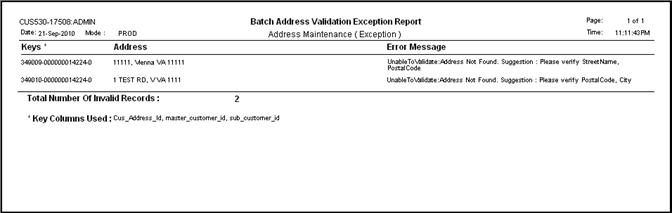
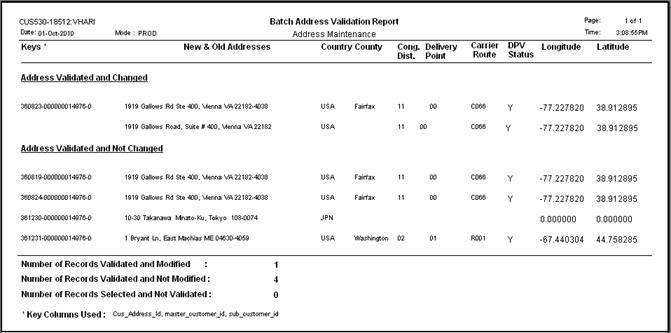
The CUS530 batch job has the ability to create two different report outputs: Address Validation Report and Address Validation Exception Report. Whether or not the batch job creates these reports is based on the value a user selects for the “Select Report Output” value.
· Address Validation Report – Lists the addresses modified by the Spectrum software alongside their original addresses. Optionally, it can also include all addresses reviewed by the batch job but not modified.
· Address Validation Exception Report – Lists all addresses reviewed by the batch job but could not be validated as “Good” or modified by the Spectrum software. This report includes the error message as to why the Spectrum software could not validate or modify the address.
Currently, this
process only functions against the CUS_ADDRESS table.
Parameter |
Description |
Required? |
| Subtitle | This
field is used to enter in a subtitle that appears underneath the
report heading.
Defaults to “Address Maintenance.” |
No |
| Report for Modified Release | This
determines if the report output lists only address records modified
by the batch job or if it lists all address records reviewed by
the batch job.
Defaults to “Y.” |
Yes |
| Select Report Outputs | This
determines the type(s) of reports output, if any, you want the
batch job to produce.
Defaults to “BOTH.” |
No |
| Input Type | This
field is used to select what type of format the batch job pulls
the address records from for processing.
Defaults to “TABLE.” |
Yes |
| Output Type | This
field is used to select what type of format the batch job updates
the validated addresses to.
Defaults to the Input Type value. |
Yes |
| Table or File Name | This
determines the table or file the batch job runs against.
Defaults to “CUS_ADDRESS.”
|
Yes |
| Process Non Validated Address | This
parameter only applies to the batch job if you run the job against
the CUS_ADDRESS table.
It determines if the batch job processes records that already have a Validated On value.
Defaults to “Y.” |
No |
| Key Column Names 1-3 | These
parameters only apply to the batch job if the Input Type = TABLE.
Defaults to “CUS_ADDRESS_ID,” “MASTER_CUSTOMER_ID,” and “SUB_CUSTOMER_ID.” |
No |
| Mail-Name Column Name | This
parameter only applies if the Input Type = CSV.
It is used to enter the name of the column in the CSV file that contains the address data to be processed by the batch job. |
No |
| Firm Column Name | This
parameter only applies if the Input Type = CSV.
It is used to enter the name of the column in the CSV file that contains the firm names to be processed by the batch job. |
No |
| Address Lines 1-4 Column Name | These parameters are used to enter the column names of the table/file that the batch job uses to enter the associated Address Lines of the validated addresses. | No |
The following parameters are used to enter the column name of the table/file that the batch just used to enter the associated values of the validated addresses:
City Column Name, State Column Name, Postal Code Column Name, Country Column Name, County Column Name, Cong. District Column Name, Address Status Column Name, Carrier Route Column Name, Delivery Point Column Name, Error Code Column Name, RDI Column Name, DPV Status Code Column Name, DPV Status Code Column Name, DPV CRMA Code Column Name, FIPS County Number Column Name, US LOT Code Column Name, US LOT Sequence Column Name, US LOST Hex Column Name
· Address Validation Report –
Lists the addresses modified by the Spectrum software alongside their original
addresses. Optionally, it can also include all addresses reviewed by the
batch job but not modified.
The report separates the address lists of those address records validated
and modified from those that were validated and not changed. It includes
all the values entered for the address record based on the validation
except for the Validated On and Validated By fields. The Validated On
value is the date you ran the batch job and the Validated By value is
the code for the Spectrum software that performed the validation (PBBI).
· Address Validation Exception Report
–
Lists all addresses reviewed by the batch job but could not be validated
as “Good” or modified by the Spectrum software. This report includes the
error message as to why the Spectrum software could not validate or modify
the address.
The report also includes a suggestion for which column values of the address
record to review in hopes of troubleshooting the error.