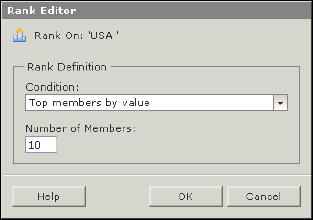
Use the Rank Editor dialog box to define the parameters of the rank you want to add to the crosstab.
You need to provide two parameters to define a rank: a condition and a value.
First you select one of the following conditions:
· Top members by value.
· Bottom members by value.
· Top contributors to % of total.
· Bottom contributors to % of total.
Then you enter either the Number of Members value or a percentage. The Number of Members value can be any integer between 1 and 2^31 (2.14E9).
The sort direction applied by the rank operation depends on the selected operator. If you choose a "Top members by value" or "Top contributors to % of total" rank, the rank also applies a descending sort. If you choose a "Bottom members by value" or "Bottom contributors to % of total" rank, the rank also applies an ascending sort.
Related Topics
· Ranking the data in the crosstab