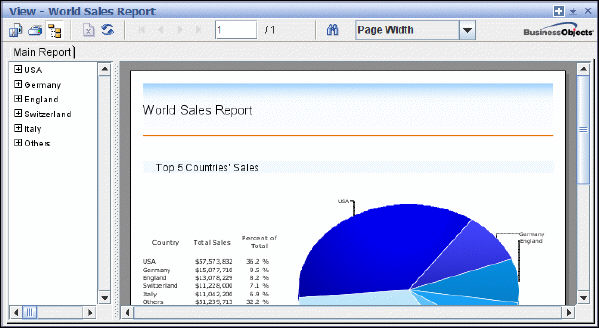
The Web Java viewer can be accessed by using a web browser that supports the Java Virtual Machine. You can view, refresh, and print your reports and export them to a variety of formats.
In addition to the functions that are provided on the browser's standard toolbar, the Web Java viewer has extra functions on its custom toolbar:
· Export report
· Print report
· Show/Hide group tree
· Stop
· Refresh data
· Go to first page
· Go to previous page
· Go to next page
· Go to last page
· Current and last page numbers
· Search for text
· Magnification factor
When you place the mouse pointer over a button on the custom toolbar, the associated description appears in the bottom left-hand side of the browser's status bar.
 You
may experience minor problems when you scroll through reports in the Java
viewer. These problems are the result of the implementation of the Java Virtual
Machine in certain web browsers. If you experience such problems, click
repeatedly on the scroll buttons to scroll. Do not hold the scroll buttons down.
You
may experience minor problems when you scroll through reports in the Java
viewer. These problems are the result of the implementation of the Java Virtual
Machine in certain web browsers. If you experience such problems, click
repeatedly on the scroll buttons to scroll. Do not hold the scroll buttons down.
Related Topics