Using
the table browser is described fully in the Designing a Schema chapter.
Using
the table browser is described fully in the Designing a Schema chapter.
The Designer interface user interface complies with Microsoft Windows standards. It features windows, menus, toolbars, shortcut keys, and online help.
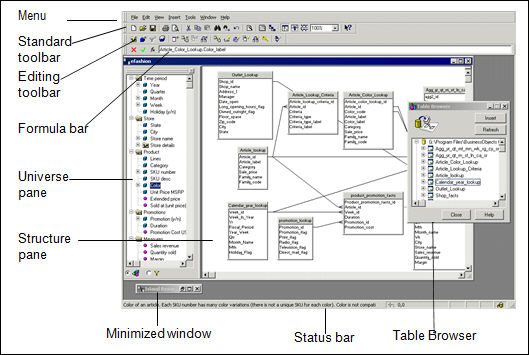
Each universe is contained within a single universe window, which is contained within the Designer main window. You also use an independent window called a Table browser which shows all the tables available in the connected database.
The universe window is divided into two panes:
| Pane | Displays |
|---|---|
| Structure | Graphical representation of the underlying target database of the universe. It includes the tables and joins to which you map objects that end users use to run their queries. |
| Universe | Classes and objects defined in the universe. These are the components of the universe that Web Intelligence users see and use to create their queries. |
The Table browser is a window that displays the tables available in the connected database. You can insert tables into the Structure pane by selecting the table and dragging it into the Structure pane, or by double-clicking the appropriate table in the Table browser.
You can display the Table browser by any of the following methods:
· Double-click the Structure pane background.
· Right-click the Structure pane background and select Insert Table from the contextual menu.
· Select Insert > Tables.
Using
the table browser is described fully in the Designing a Schema chapter.
The main components of the interface are labelled below: