Or
Click the Check Integrity button.
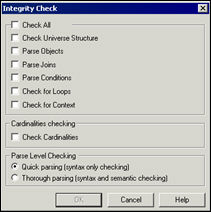
The Integrity Check dialog box appears.
To verify universe integrity:
1. Select
Tools > Check Integrity.
Or
Click the Check Integrity button.
The Integrity Check dialog box appears.
2. Select check boxes for components to be verified.
 You can select
Check Cardinalities independently of the Check All option. This allows
you to verify the universe structure without checking cardinalities which
may take a long time depending on the database.
You can select
Check Cardinalities independently of the Check All option. This allows
you to verify the universe structure without checking cardinalities which
may take a long time depending on the database.
3. Clear check boxes for components not to be verified.
4. Select
the Quick Parsing check box to verify only the syntax of components.
Or
Select Thorough Parsing check box to verify both the syntax and semantics
of components.
5. Click
OK.
A message box displays the universe check progress.
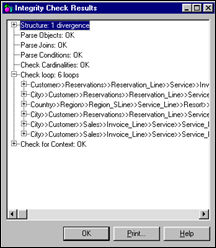
If Check Integrity encounters no errors, it displays “OK” beside each error
type.
6. Click
the plus sign (+) beside the error type to view the list of components
in which the error occurred.
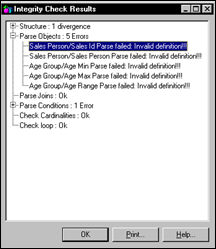
7. You can double click an item in the list to highlight the corresponding components in the Structure pane.
8. Click the Print button to print the window contents.
9. Click OK.
Before
selecting the Check for Loops check box, ensure that the cardinalities
of joins have already been detected. Otherwise, the function erroneously
identifies loops in the joins.