1. Question: The document will not open in Microsoft Excel when I double or single-click it. How can I fix this?
Answer: You need to implement this function in Microsoft Excel 2003. To do so, follow the steps below:
In Microsoft 2003 and prior versions:
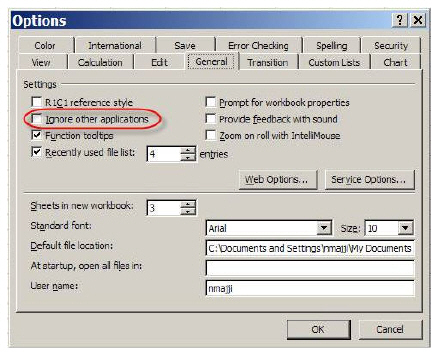
a. From Excel menu bar, select Tools > Options.
b. The Options Screen displays.
c. Select the General Tab.
d. Uncheck "Ignore Other Applications."
e. Click OK.
f. Close Microsoft Excel.
To Implement in Microsoft 2007:
a. Click on the Microsoft Excel ribbon.
b. Select Excel Options.
c. Select Advanced.
d. Scroll down to General.
e. Uncheck "Ignore other applications that use Dynamic Data Exchange (DDE)."
f. Close Microsoft Excel.