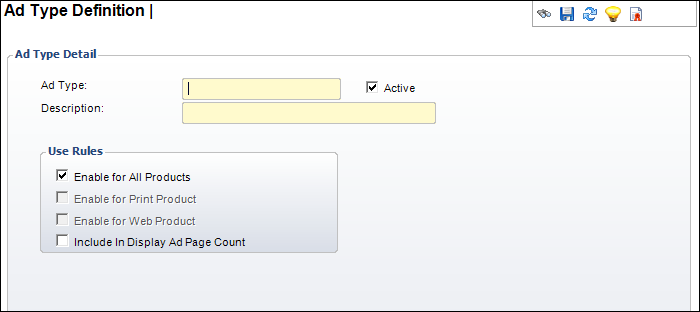
The Ad Type Definition detail screen displays, as shown below.
The Advertisement Type Code is one of four 6-character (maximum) codes that automatically creates the product code during advertising product creation. While the system comes with product and ad type codes, the system codes are fixed. These advertisement type codes are user-defined allowing you to define more advertisement types.
To define advertisement types:
1. From
the Advertising Code
Central screen, click the Ad Type
Code icon.
The Ad Type Definition search screen displays.
2. Click
Create New Ad Type.
The Ad Type Definition detail screen displays, as shown below.
3. Enter the Ad Type in the text box.
4. Enter the Description in the text box.
5. If necessary, uncheck the Active checkbox.
6. Check the checkbox that applies:
· Enable for All Products
· Enable for Print Product
· Enable for Web Product
· Include In Display Ad Page Count
7. Click
Save.
Repeat these steps for each advertisement type you want to define.
Screen Element |
Description |
|---|---|
| Ad Type | Text box. This is a 6-character (maximum) code representing the advertisement type. Examples of a print Ad Type are DISPLY, ARTCLE, or CLASSF. Examples or a Web Ad Type are BANNER, BUTTON, or POPUP. |
| Description | Text box. A brief description of the advertisement type you are creating. Used for clarification. |
| Active | Checkbox. Displays whether this advertisement type is active. Defaults to checked. Only an active Ad Type can be selected for an advertising product. |
| Enable for All Products | Checkbox. When checked, indicates the Ad Type code is available for all advertising products. |
| Enable for Print Product | Checkbox. When checked, indicates the Ad Type code is just for print advertisements. |
| Enable for Web Product | Checkbox. When checked, indicates the Ad Type code is just for Web advertisements. |
| Include In Display Ad Page Count | Checkbox. |