Each method of accessing the Personify WSD has a specific authentication method. There is no additional authentication or log-in required when accessing the Personify WSD once a developer has already logged into Personify Enterprise, as the credentials used to log into Personify Enterprise are used to access the Personify WSD. When the Personify WSD is launched using the .exe file as stand-alone application, a login dialog will be displayed. The developer will be required to enter their Personify Enterprise credentials to launch the Personify WSD.
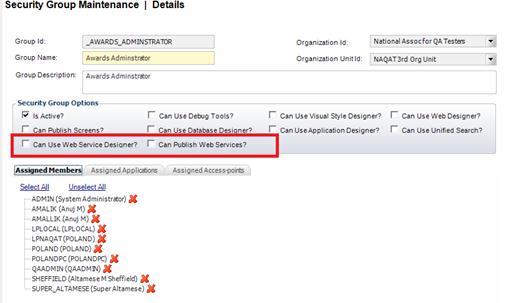
System Administrators have two levels of authorizations/permissions for granting access to the Personify WSD. In order to provide the most flexibility and control to System Administrators, the two global group permissions (highlighted in the image below) have been added to Security Group Maintenance (PSM002) screen.
Can Use Web Service Designer?
Checking this box grants the developer permission to access and use
the Personify WSD. This access enables the developer to design elements,
compile and publish locally, and test.
Can Publish Web Services?
Checking
this box grants the developer additional permission to publish the
Web Services beyond their local machine and on to a server.
 Please
see the Security section of the
7.4.0 Online Help for more details on setting up permissions.
Please
see the Security section of the
7.4.0 Online Help for more details on setting up permissions.