A database computed column can be defined as an expression that can use other columns in the same table as well as using other table values via user-defined database functions. However, the expression cannot be a sub-query.
Unless otherwise specified, computed columns are virtual columns that are not physically stored in the table. Their values are recalculated every time they are referenced in a query. However, when a computed column is created using the PERSISTED keyword, the database will physically store computed columns in the table. Their values are updated when any columns that are part of their calculation change. By marking a computed column as PERSISTED, you can create an index on a computed column that is deterministic but not precise.
Things to note:
1. Computed Columns cannot be added to base tables using the Database Designer. This functionality is limited to user-defined tables only.
2. Once the database changes are submitted, the computed column expression cannot be changed. Instead drop and recreate the computed column with new expression.
Since a computed column's value is determined by an expression, such properties are marked as read-only in generated user layer APIs and do not participate in Inserts or Updates. However, they are available readily to bind on the screens and can participate in searches.
This section outlines the ability to create such columns in user defined tables using Database Designer.
To add a computed column:
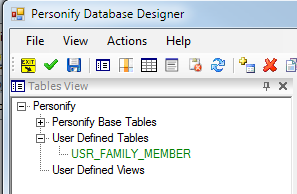
1. From
the Tables View window, double-click the appropriate user-defined table,
as shown below.
2. From
the Columns tab, select a new row, as shown below.
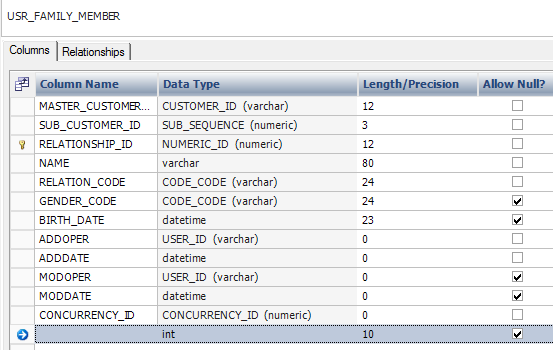
3. From
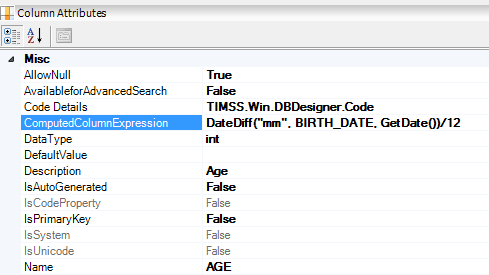
the Columns Attribute window, enter the Name,
Description, appropriate Data Type, and Computed
Column Expression, as shown below.
4. Save the changes and submit the database changes to create the computed column.