 defining the field, you must define the code type so the system will know
which codes are valid.
defining the field, you must define the code type so the system will know
which codes are valid.
Once you created a new database column using Database Designer, you can add to your database column. Code validation can be run against a number of codes, such as:
· Application codes
· Application subcodes
· Custom codes where the table and selection parameters are user-defined
You can create a new column with the data type of “CODE_CODE” to add validation code.
defining the field, you must define the code type so the system will know
which codes are valid.
To add validation code:
1. Create user-defined codes on the System Types and Codes (APP005) screen in Personify.
2. In Database Designer, highlight the table with user-defined columns and a Data Type of “CODE_CODE”.
3. In
the Column Attributes section, select Code
Details.
The Code Details window displays as shown below.
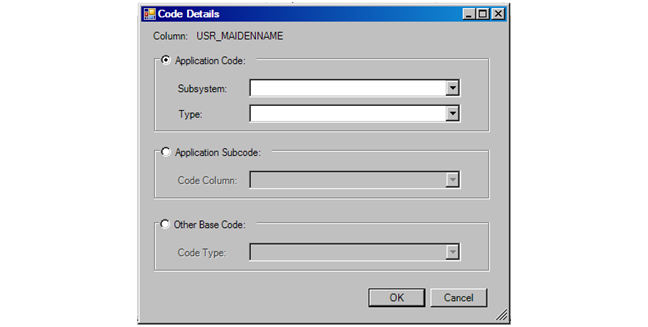
4. Select the applicable radio button:
· Application Code – Allows you to select a specific subsystem’s type codes.
· Application Subcode – Allows you to select the subcodes from the type codes selected by another column with a Data Type of CODE_CODE.
· Other Base Codes – Allows you to select from the system’s base codes.
5. Select the code from the drop-down.
6. Click OK.