
The Personify Mobile application is a Smartphone application, available on the iPhone, Blackberry, and Android, that provides a mobile view into the constituent database optimized for mobile users. This mobile app includes constituent-facing functionality working with member directories and profiles, meetings and conferences, and featured products. It provides rich social networking and linking functionality.
This section introduces you to the functionality available in the Personify Mobile application broken down by module. It also provides you with an overview of the different user types recognized by the application and the available Personify functionality your organization can employ. Finally, a list of devices supported by TMA Resources for Personify Mobile is provided.
 While
the Personify Mobile application can be downloaded for the Apple iPad,
the application may look and feel differently than the other devices.
While
the Personify Mobile application can be downloaded for the Apple iPad,
the application may look and feel differently than the other devices.
When your users first open the mobile application, they are presented with a homepage that offers icons for each available module. An image of the default homepage for the iPhone is displayed below, on the left. The second image below on the right displays two additional icons that can be seen on the second homepage.
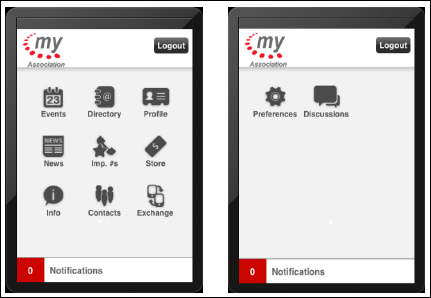
The
screenshots provided in this section are primarily taken from the iPhone.
When applicable, the slight differences between the three devices will
be called out accordingly.
While reading through this section, keep in mind that the mobile application is configurable in a variety of ways to meet the needs and desires of your organization. Information on configuring each module, as well as the overall security and startup of the application, is available in Configuring your Mobile Application.
This section is intended for system administrators with extensive knowledge of your association’s Personify database, Personify Studio Tools, and Personify e-Business website. Users should have previous experience with SQL Server 2008 and web service installation.
This section is NOT intended for consumption by users of the actual Personify Mobile application. Screenshots of the look and feel of the mobile application are added for your reference only.