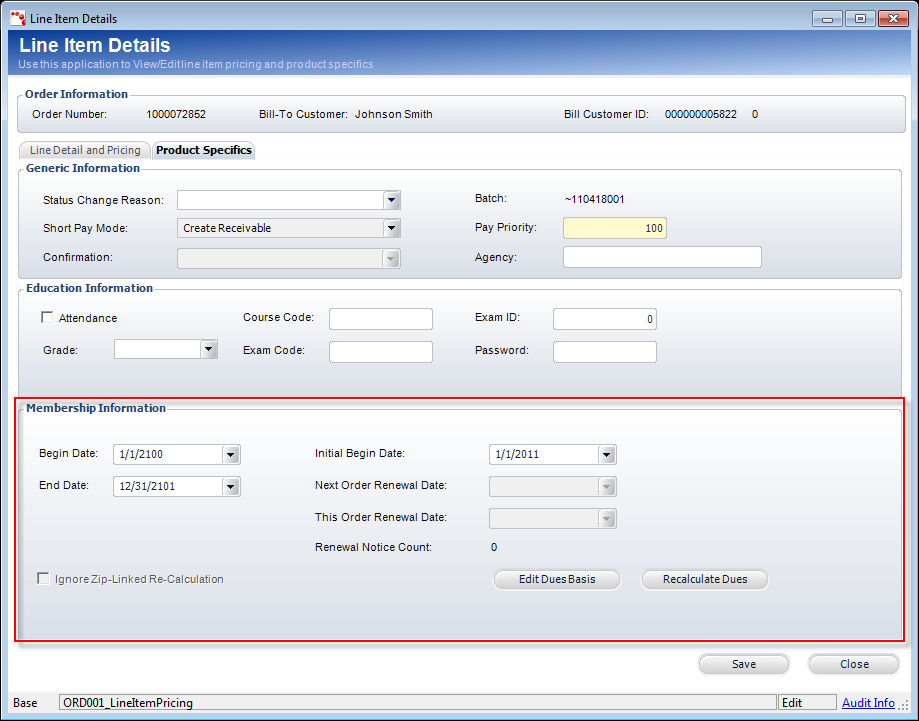
Certain circumstances may require that membership-specific details of
an order be changed. For example, the begin date, end date, or initial
begin date may need to be changed or specific renewal options may need
to be defined. The Membership Information section, as highlighted below,
on the Product Specifics tab includes the membership-related fields. To
access the Line Item Details screen, right-click the appropriate line
item and select Show Full Line Item Detail.
The following options can be configured on the Product Specifics tab of the Line Item Details screen to accommodate any special circumstances:
Begin Date and End Date - changing the Begin Date or End Date could have an effect on the pricing if the association is using the proration feature. You may want to change the Begin Date and/or End Date of a membership if the member would like to defer their begin date to the next month or a month in the future. When you change the Begin Date, the End Date will automatically change to give full 12 months if the membership scheme is setup for anniversary based membership. If not, the End Date will stay the same. In some cases, you will need to extend the end date to give a member additional months of membership. Select the appropriate End Date from the drop-down calendar. Changing the End Date will not affect the Begin Date. For more information, please see Changing the Begin/End Date of a Membership.
Initial Begin Date – changing the Initial Begin Date of the membership product will only change this order. This can be different than the Begin Date selected. The Next Order Renewal Date will be automatically populated when the next period’s order is activated. The This Order Renewal Date will be populated when the order is activated and the order is a renewal of membership.
Renewal Notice Count - this number is updated when the MBR655 batch process is run for this order.
Renew to Credit Card - when the membership product is renewable and the Auto Pay Method (defined on the Line Detail and Pricing tab) is set to “Credit Card”, the Renew to Credit Card checkbox displays. If you want to membership to automatically renew to the customer’s credit card, then check the Renew to Credit Card checkbox.
 If
a payment schedule exists, checking this checkbox will NOT automatically
create a payment schedule for the renewal order.
If
a payment schedule exists, checking this checkbox will NOT automatically
create a payment schedule for the renewal order.
Ignore Zip-Linked Re-Calculation - if a member’s chapter needs to remain the same during the renewal process even if they have moved to another region or for any other reason, select the Ignore Zip-Linked Re-Calculation.
Edit Dues Basis - to modify the dues basis for only this order, click Edit Dues Basis. See Adding a Dues Basis for more information.
Recalculate Dues - the application recalculates the dues based on the information you changed on this screen.