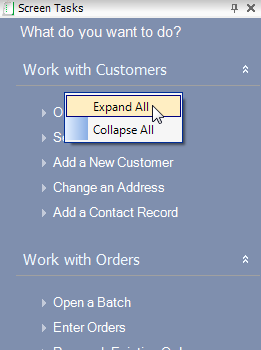
The Screen Tasks tab (shown below) in the Task Bar contains task categories specific to what options are available to you and what screen you are on.
Task categories are context-sensitive to tasks available for each screen. Expanding a task category will reveal various related tasks. The task category displays options pertinent to the opened screen which include:
· Tasks that help you navigate to areas within the screen you are currently in.
· Tasks that modify data immediately when you select them (e.g. the "Validate Product" task on the Product Maintenance screen).
· Tasks
that open a new screen and pass ID of the record you're viewing (e.g.
if you click "Create an Order" from the CRM360 screen, the Order
Entry screen will open with a new order for the constituent you were viewing
in CRM360).
When you expand a task category, you will see multiple tasks that are available to you; upon clicking on a task, the corresponding content will display in the content window to the right.
 As
of 7.4.1, you can have multiple task categories expanded at one time and
you can expand all and collapse all by right-clicking anywhere in the
task bar, as shown below.
As
of 7.4.1, you can have multiple task categories expanded at one time and
you can expand all and collapse all by right-clicking anywhere in the
task bar, as shown below.