The Search Categories screen displays, as shown below.
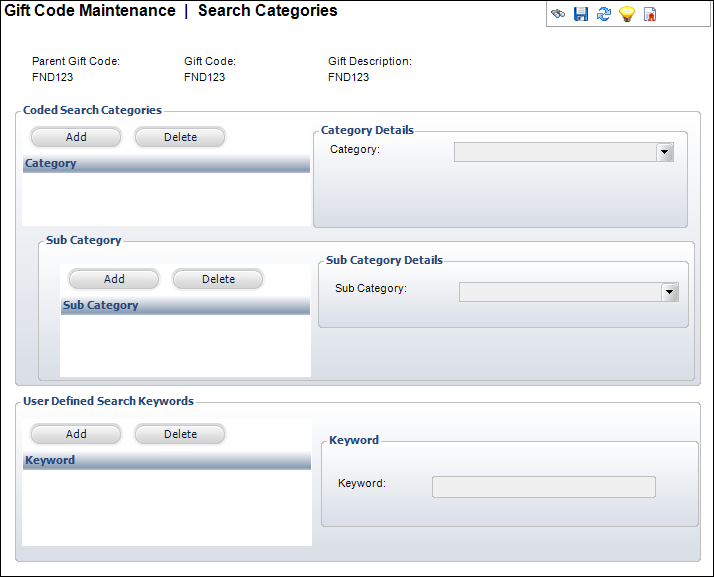
The Coded Search Categories section extends the functionality of keywords by allowing gifts to be queried by commonality. Where multiple gifts of the same type exist, the type is defined as the classification or category and the gifts may be defined within the classification.
The User Defined Search Keywords section associates common terms or phrases with the active gift. The goal in creating keywords is to provide a useful utility for product searches over the Web. To improve search results, keywords should be general and have a logical connection to the gift for which it is defined.
To set up categories and keywords available through eBusiness:
1. Click
Categories and Keywords from
the Relationships task category.
The Search Categories screen displays, as shown below.
2. Click Add and Select a Category from the drop-down menu in the Coded Search Categories section.
3. Click Add and select a Sub Category from the drop-down in the Sub Category section.
4. Click Add and enter a Keyword in the User Defined Search Keywords section.
5. Click Save.
| Screen Element | Description |
|---|---|
Coded Search Categories |
|
| Add | Button. When clicked, a row is added to the Coded Search Categories table and the corresponding fields are enabled to add a category. |
| Delete | Button. When clicked, the highlighted row from the table and the information entered in the Category Details fields are deleted. |
| Category | Drop-down. Category used for searching from the Web and the back office. |
Sub Category |
|
| Add | Button. When clicked, a row is added to the Sub Category table and the corresponding fields are enabled to add a category. |
| Delete | Button. When clicked, the highlighted row from the table and the information entered in the Sub Category Details fields are deleted. |
| Sub-Category | Drop-down. Sub-Category used for searching from the Web. |
User Defined Search Keywords |
|
| Add | Button. When clicked, a row is added to the User Defined Search Keywords table and the corresponding fields are enabled to add a keyword. |
| Delete | Button. When clicked, the highlighted row from the table and the information entered in the Keyword fields are deleted. |
| Keyword | Text box. User-defined keyword used for searching from the Web and the back office (not validated). |