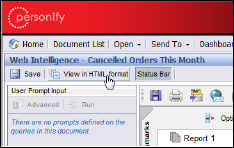
To export a report in HTML format:
1. When
viewing a report, it defaults to HTML format; if you are currently viewing
it in PDF, click View in HTML format to return to the original format
(depending on your Webi Document settings).
 You can also
use the Document menu if you are viewing a report in HTML format.
You can also
use the Document menu if you are viewing a report in HTML format.
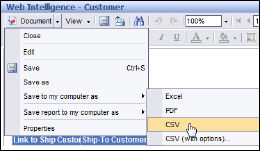
2. From
the report menu bar, select Document
> Save to my computer as > CSV.
The File Download confirmation message displays.
3. Click Save and save the file to the desired location.