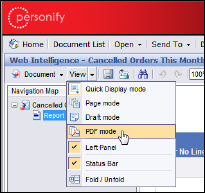
The report is displayed as a PDF.
To export a report as a PDF:
1. From
the View menu in the Report toolbar, select PDF mode.
The report is displayed as a PDF.
 You cannot
save the report to your computer in HTML (Page or Draft mode).
You cannot
save the report to your computer in HTML (Page or Draft mode).
2. Click Save a Copy on the Adobe PDF toolbar and save the file to the desired location.
Do not use
the Save button in InfoView to save your report as a PDF. This will only
cause your report to refresh.