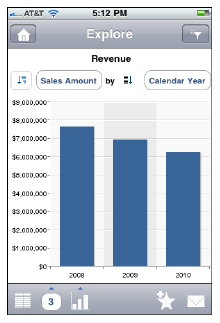
SAP BusinessObjects Explorer offers an intuitive path to quickly search and explore data for instant insight into your business. With Explorer for iPhone/iPad, insight into your business is never more than a few flicks away. Through simple keyword search, navigation and visualization, Explorer allows you to ask and answer business questions that pop into your head regardless of where you are. Whether you are visiting a customer and need to see what orders they’ve placed, at a café dreaming up a new marketing program, or in the board room discussing this quarter’s revenues, Explorer for iPhone/iPad puts all of your business information at your fingertips.
To set up the BO Explorer on iPhone or iPad:
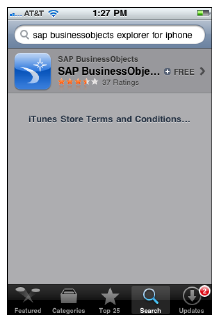
1. Download the SAP BusinessObjects Explorer from the Apple App Store.
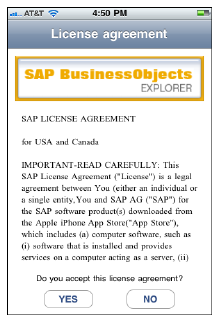
2. Once downloaded, accept the license agreement.
3. Add the explorer connection to your corporate account.
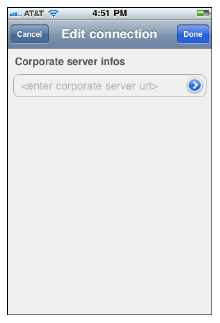
4. Enter the server infos url: http://38.105.85.34:8080/polestar
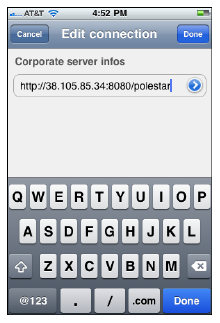
5. Click Done.
6. On the next screen, enter the following information:
· Name: BOE31
· System: boe31:6400
· Username: RSNAUser
· Password: rsnauser
· Authentication: Enterprise
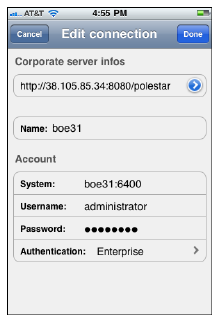
7. Once the login credentials are entered, you will observe the new connection info been added.
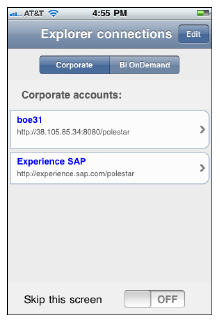
8. Click on the newly added connection to access the available info spaces.
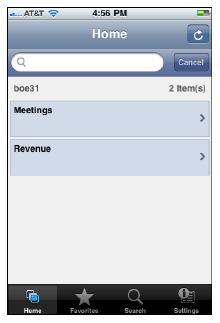
9. Click on the appropriate info space to start exploring your data.
 Revenue and Meeting Advantage are the only working infospaces.