 This workaround is relevant until Java 6 update 21.
The following BO, Personify, and Java versions are recommended for Business Objects to run properly on client machines:
|
However, if you require the latest version of Java on your client machines to support other applications, install the latest version and perform the following workaround. This must be done in order for Business Objects to perform normally until a fix is released for the issue.
This workaround is relevant until Java 6 update 21.
Mixed Code Protection Options for Users:
User can manage how mixed code programs are handled through the Java Control Panel.
To access the Java Control Panel select, Start > Control Panel > Java Control Panel > Advanced > Security > Mixed code. Enable - show warning if needed.
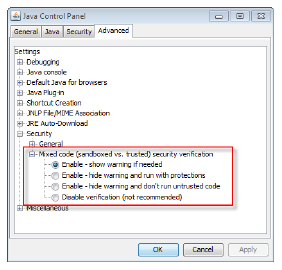
The following are the available options:
Enable - show warning if needed: This is the default setting. When a potential security risk is encountered, a warning dialog is raised. Clicking Yes blocks potentially unsafe components from running and may terminate the program. When the user clicks No, the application or applet continues execution with protections (packages or resources that are later encountered with the same names but have different trust levels, i.e., signed vs. unsigned, will not be loaded).
Enable - hide warning and run with protections: This option suppresses the warning dialog. The code executes as if the user had clicked No from the warning dialog.
Enable - hide warning and don’t run untrusted code: This option suppresses the warning dialog and behaves as if the user had clicked Yes from the warning dialog.
Disable verification: This option is not recommended. This option completely disables the software from checking for mixing trusted and untrusted code, leaving the user to run potentially unsafe code without protections.
To avoid malfunctions in your reports, you need to disable the autoupdate feature in Java to keep it from upgrading.
To disable this feature:
1. Right-click on the Java icon located on your task bar.

2. Click Open Control Panel.
3. Click the Update tab.
4. Uncheck “Check for updates Automatically.”
5. Click Apply.