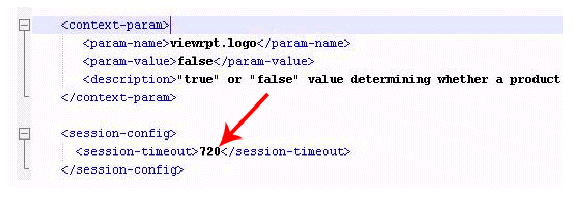
If desired, you can alter the session timeout value which determines how long a session in BusinessObjects can be idle before the application “times out” and the user needs to log in again. This is ultimately a security feature to prevent unauthorized users from accessing the application without permission.
To change the Tomcat Web server settings:
1. Log into the server installed with BusinessObjects.
2. Navigate to the following file path on your BOE Server:
Program Files\Business Objects\Tomcat55\webapps\CrystalReports\WEB-INF
3. Open Web.xml in a text editor like Notepad, and set the session-timeout value as desired (in minutes); e.g. 720.
4. Save the web.xml file.