 This
section should be performed by your website’s administrator.
This
section should be performed by your website’s administrator.
After you have created a new page to your website, you must add the Abstracts modules to that page.
This
section should be performed by your website’s administrator.
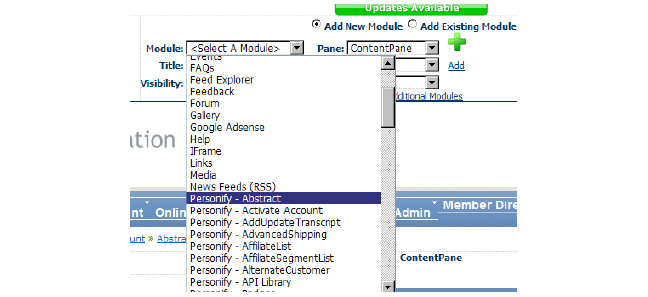
To add the Abstracts module to your page:
1. While
viewing the blank page, select “Personify - Abstract” from the Module
drop-down in the Control Panel.
If
necessary, you may delete the “Enter Title” module that appears on new
pages.
2. Ensure
the “ContentPane” is the defined Pane (it is the default) and click Add.
The Personify - Abstract Web module displays on your page.
3. From the Module drop-down, select “Personify - Menu Abstract”.
4. Select “LeftPane” from the Pane drop-down.
5. Click Add.
See also: Modifying ABS Module Settings